
Cammus C12 Direct Drive Steering Wheel
Shenzhen CAMMUS Electronic Technology Co., Ltd., better known by the short name Cammus, is no longer an unfamiliar name to many simracers. This Chinese manufacturer is primarily known for its affordably priced sim racing hardware in the more serious segment.
Previously, we had the opportunity to review both the GT1 DD Bundle and the LC100 pedals for Cammus. But that’s not all – earlier this year, we were also highly impressed by the C5 Direct Drive Steering Wheel, where Cammus integrated a compact 5Nm wheelbase into a steering wheel. This time, we have the privilege of getting our hands on the bigger brother of the C5. Cammus has asked us to review the Cammus C12 Direct Drive Wheelbase, and after our experience with the C5, we enthusiastically responded with a resounding “Yes, please!”
As of the time of writing, the Cammus C12 Direct Drive Wheelbase is priced at $549.00 including tax. If you place your order directly through Cammus’ webshop and use the discount code “SRBCAMMUS,” you’ll receive an additional 5% off the total amount.
Packaging & Contents
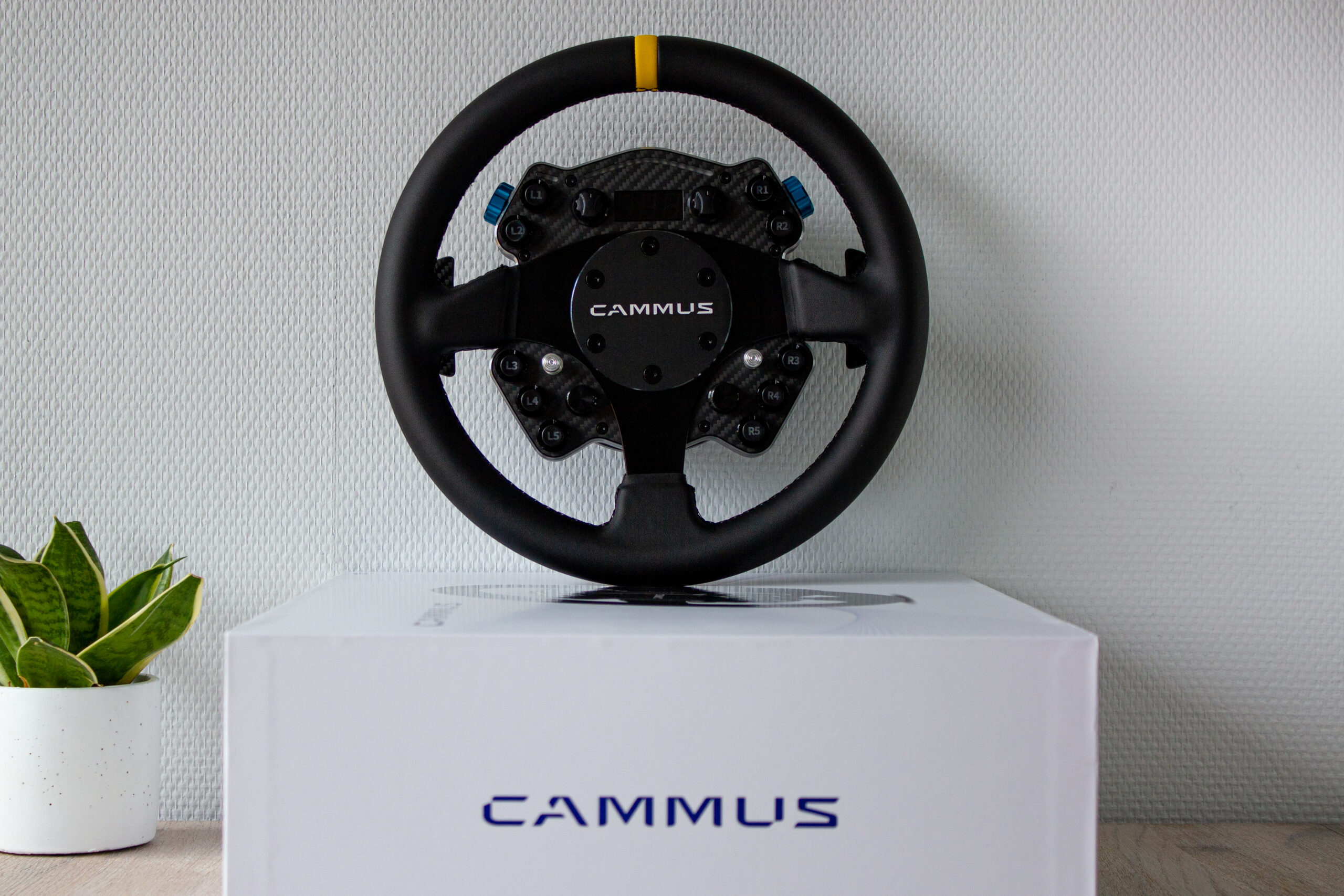
After 5 days, the DHL courier arrived at our door to deliver a brown box. Inside this brown box, we found a completely white product box instead of the fully black box we encountered with products like the C5 Direct Drive Wheelbase and the LC100 Pedals. The white product box gave us a premium impression. It had a sleek, minimalist look with a beautiful wavy line pattern and a product photo on the front. The Cammus branding in shiny dark blue on the matte white base color of the box completed the overall aesthetic. Although it doesn’t add anything tangible to the product itself, such a beautiful box always makes us eager to open it up and dive in.


When we lift the lid of the box, we find a long white box, a sheet of soft black foam, and the product manual. Removing the black foam, we discover a beautifully designed steering wheel neatly recessed in a black foam block. One thing that immediately catches our eye about the wheel is that the marking at the top is yellow instead of the red color shown on the box and the website. Inside the long box, we find (almost) all the components needed to connect the Cammus C12. Included are the power adapter, the power plug, a USB-A to USB-B cable, two mounting brackets, a small fan, and a bag containing an Allen key and screws. The only thing not included with the Cammus C12 is the table clamp, which must be purchased separately for $29.00. We consider this a drawback, as the included fan can only be used in conjunction with this table clamp.


Engineering & Quality
The Direct Drive steering wheels by Cammus present a truly unique concept, with Cammus integrating an electric motor into the central housing of a steering wheel. As the name suggests, the C12 Direct Drive Steering Wheel has the capacity to deliver a torque of 12Nm, which we find impressive given the size of the housing. The steering wheel, including the housing, is only 106mm deep, making it genuinely compact. Its base consists of a sturdy aluminum alloy that encases the copper windings of the electric motor. In contrast to a typical direct drive wheelbase, where a central shaft serves as the rotor, with the C12, it’s the exact opposite: the outer part of the wheelbase can move while the inner part remains stationary.
Similar to a traditional wheelbase, the Cammus C12 Direct Drive also features a series of sockets at the rear. In the central part of the wheelbase, there’s a port for power supply, a USB-B port for connecting to a computer, two USB-C ports for attaching pedals or a shifter, and finally, an outgoing power port for the included fan. Above all the connections, you’ll also find the power button, a small reset button, and an indicator light to show if the wheelbase is on. Additionally, there are four screw holes on the back for attaching the mounting brackets.

The steering wheel impresses us with its high-quality appearance right from the start. Like the housing, the base of the steering wheel is made of an aluminum alloy and is neatly finished with a carbon cover plate on the front. In terms of input options, the C12 steering wheel certainly doesn’t lack anything. On the front of the wheel, we find ten push buttons with high ridges to protect them from accidental operation. The buttons on the left side are neatly labeled from L1 to L5, while those on the right are marked from R1 to R5. Each button features an internal LED that can be customized to change the button’s color. At the bottom of the front, there are two black metal rotary encoders with a textured finish for grip. Besides being rotatable, these encoders can also be pressed as buttons. Positioned at the bottom right is a so-called “funky switch” with a bare aluminum head. This 7-way funky switch can be pressed in four directions, rotated in two directions, and used as a button for the seventh input option. At the same position on the left side of the wheel, we find a similar aluminum lever. This is a fully analog joystick that can be freely moved in any direction and can also used as a button. At the top of the wheel, there are two more rotary encoders. These encoders, with a plastic head, can only be rotated and cannot be pressed. As if this weren’t enough input options, there are also two thumb encoders located on the left and right outer sides of the wheel. These encoders feature a stylish light blue colored wheel that can be rotated with the thumb. And, once again, these two encoders can also be used as a push button.


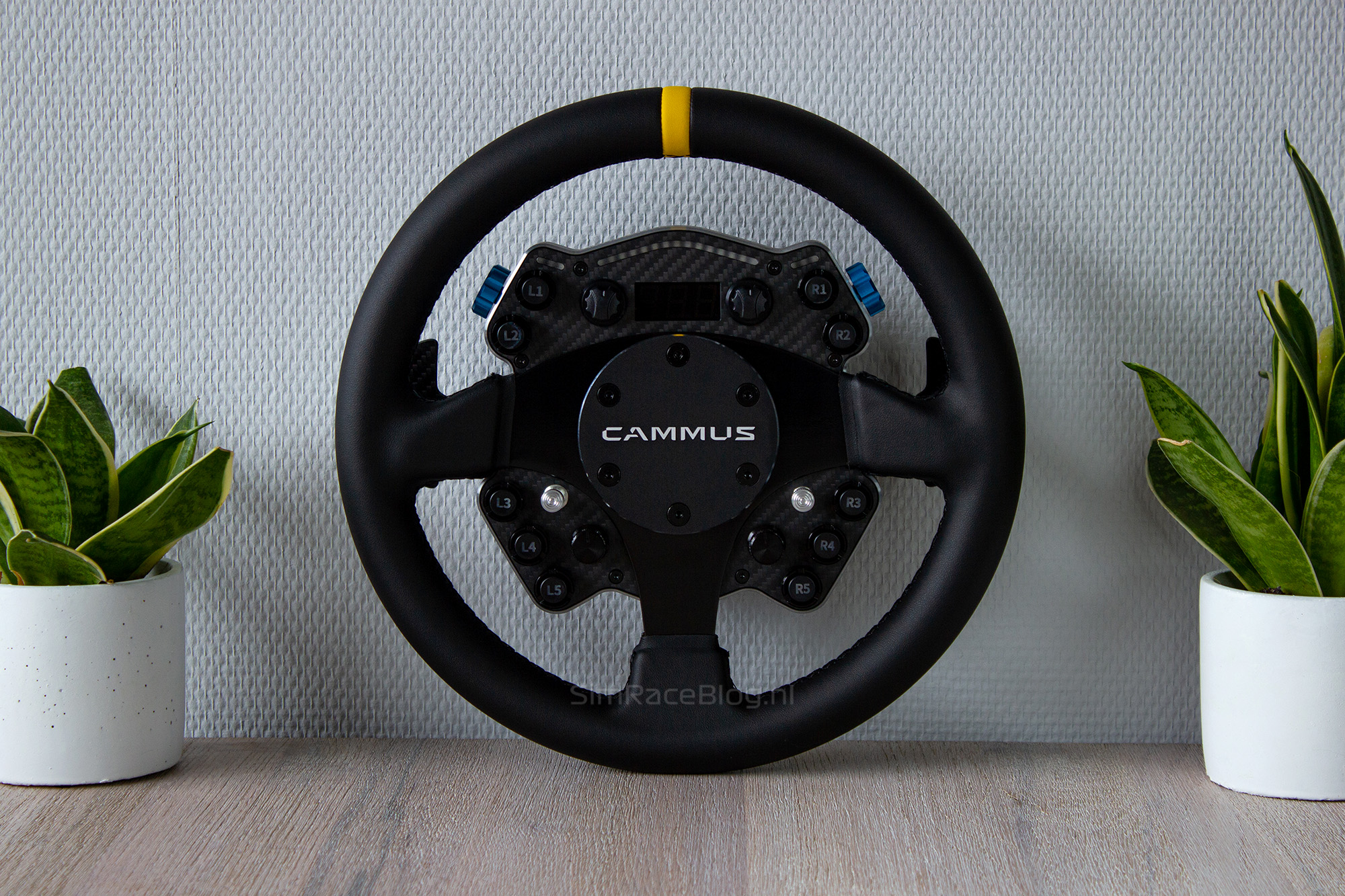
Of course, the front of the wheel is not only equipped with input options but also provides important output for the driver. At the top edge of the wheel, LEDs are placed in a triangular shape to display the RPM. On the left and right sides, this strip is accompanied by a smaller strip with flag LEDs. Below the central LED strip and between the two rotary encoders, there is a small display that can show vehicle speed or gear information.
The whole setup is encased in a leather-covered steering wheel with a yellow marker at the top. The steering wheel is attached to the heart of the wheelbase with a 6x70mm hole pattern, where a nice cover plate with the Cammus branding is located. This means that the steering wheel itself should be interchangeable with any separate steering wheel that also has the same hole pattern.


On the backside of the steering wheel, as expected, we find two shift modules. Unlike the C5 steering wheel, which surprised us with very small paddles, the C12 steering wheel has two full-size modules. These shift modules feature a magnet for feedback and a carbon fiber paddle for operation. There are no adjustment options available for the shift modules, so they can only be placed in one fixed position. Finally, at the top of the back of the steering wheel, there is a capped USB-C port, referred to in the manual as the “HUB upgrade interface.”


Mounting
With everything neatly unpacked, we can proceed to mount the Cammus C12 steering wheel on our FormulaSimRigs Avanzata. We choose to do this because we consider 12Nm to be quite a lot of torque to mount on our desk. Mounting the C12 steering wheel on a rig can be done in two ways: the first method involves using the optional clamp, and the second method involves directly attaching the supplied brackets to a wheel deck. We personally find direct mounting on our rig to be the neatest option. The supplied brackets are easy to screw onto the back of the wheelbase. Since the holes in these mounting brackets have a standard distance from each other, they align perfectly with the holes in our generic wheel deck. As a result, we mount the C12 in just a few minutes on our rig. Connecting the USB cable and power cable is also relatively straightforward but not without a minor caveat. The mounting brackets are located at roughly the same height as the connection ports on the back of the wheelbase. This means our wheel deck somewhat obstructs easy access to plug the cables into the back of the wheelbase. Fortunately, our wheel deck is short enough to allow the cables to fit between it and the wheelbase, so we don’t have too much trouble with it.
One downside of mounting directly on a wheel deck is that the supplied fan cannot be attached anywhere. The Cammus table clamp has holes that allow the fan to be secured to the clamp itself, allowing it to blow cool air over the cooling fins of the wheelbase. Without the clamp, we rely on the passive cooling of the wheelbase.
With everything neatly in place, we do need some time to get used to how the whole setup looks. Normally, there’s a (large) black wheelbase behind the wheel, but now it seems like the wheel is hanging in the air. This works in our favor, as we prefer to have our monitor positioned directly behind the wheel. With the wheelbase integrated into the wheel, we have plenty of space behind the wheel, allowing us to position our monitor exactly where we want it, nice and close. We’re eager to start driving some virtual kilometers with this new configuration.


Software
Before using the C12, the Cammus software needs to be downloaded. Since we already had it installed from previous reviews, we were able to skip this step ourselves.
The software itself is easy to use. When we connect the Cammus C12 Steering Wheel to the computer and turn it on, it is immediately recognized in the software. One notable aspect is that the software distinguishes between the wheelbase and the steering wheel itself, as they are displayed as separate components in the main menu. On the left side of the main screen, we find the menus Main, Parameter, Devices, and Update. The first thing that catches our attention in the menu is a small red dot next to the Update heading. Navigating to the Update menu, we see another red dot next to the C12 Wheel Base Firmware, indicating that it is not up to date. By clicking on the large green button labeled “Open Firmware Update Assistant,” we enter a menu where all connected components are visible, each with an “Update” button next to it. With a simple press of the button, the new firmware is downloaded and installed, ensuring that our wheelbase is fully up to date.


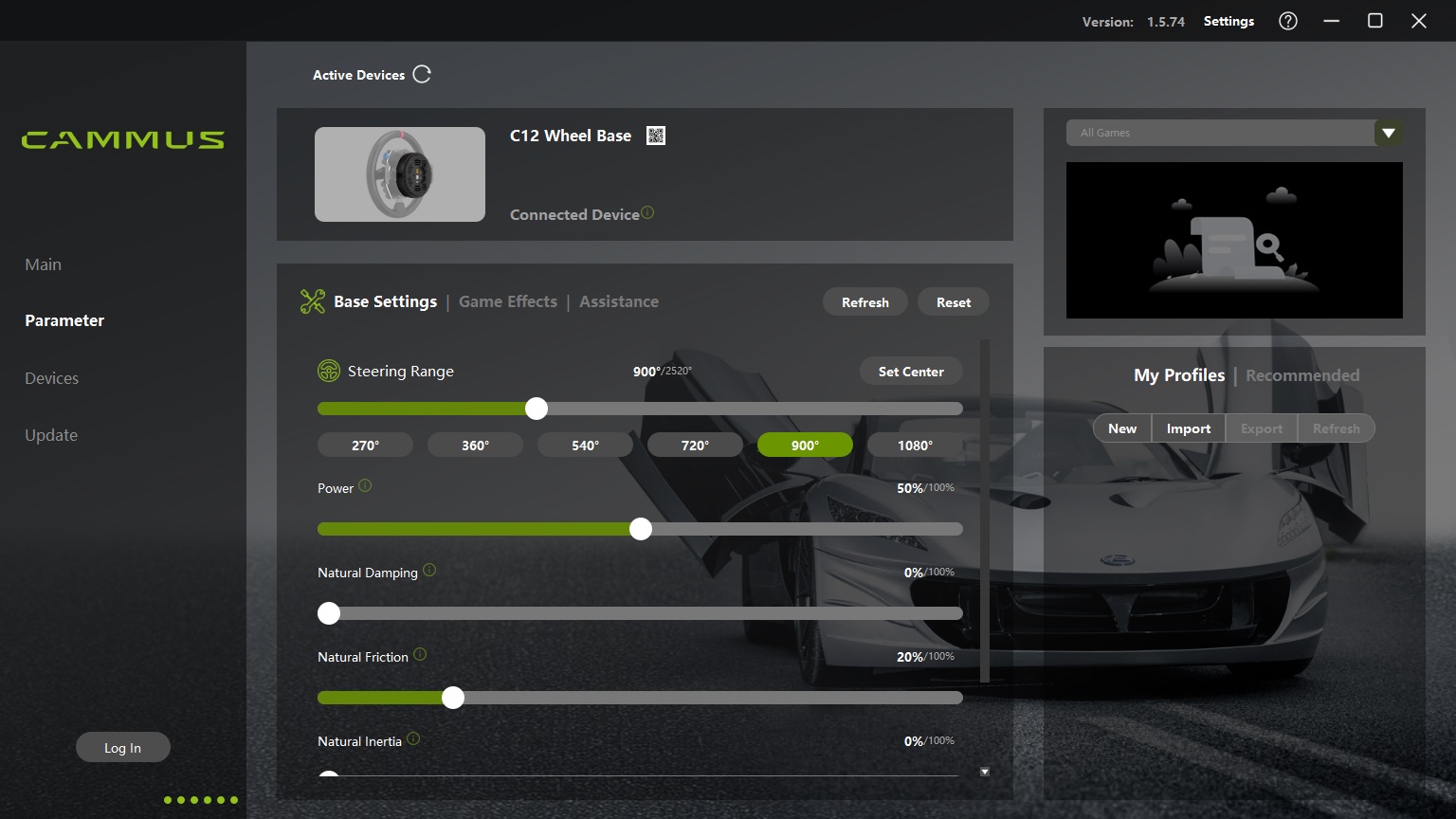
Of course, we can use the software for more than just updating the firmware. When we navigate to the Parameter menu, we arrive at the page for setting up the C12 wheelbase. Here, we find three tabs that we can use to customize the wheelbase according to our preferences. The first tab is called “Base Settings,” where we have the ability to adjust all the basic settings of the wheelbase. Examples include the amount of rotational degrees, the force feedback strength, as well as the damping and friction felt when turning the wheel. The second tab, named “Game Effects,” pertains to a set of filters that also affect the behavior of the wheelbase. If we’re unsure about the function of a particular slider in the menu, we can hover our mouse over the green “i,” and a tooltip will appear providing a brief explanation of the slider’s function. The last tab, “Assistance,” is used for miscellaneous settings. Here, we can invert the force feedback, enable hands-off protection, and adjust the hardness of the end stop, among other things. A particularly useful feature on this tab is the overheat protection, where we can set a temperature limit at which the wheelbase reduces its power output to prevent overheating. Finally, on the right side, we can create numerous profiles to customize settings for each simulation or even each car. However, it’s essential to note that profiles need to be manually activated and are not automatically loaded.


The last section in the main menu is the Devices section. Here, we have the option to configure the steering wheel itself. On the first tab, named “Steering Wheel,” we can adjust the rotational degrees, center the steering wheel, and check if all inputs from the wheel are being registered. Additionally, we can enable the “Simulate Mouse” and “Simulate Keyboard Arrows” functions, which are related to the joysticks located at the bottom of the steering wheel. The second tab, “Dashboard,” allows us to control all the lighting and the display on the steering wheel. Here, we can adjust the brightness of all lighting, choose whether to display speed in km/h, miles/h, or the current gear on the screen, however we can also select five presets for our RPM LEDs, and assign a custom color to each button determining the color the corresponding LED should emit. The last features found here, which might have been better placed in the previous tab, are the functions for the rotary encoders at the bottom of the steering wheel. Here, we can choose whether to send a plus or minus signal per rotation or use the encoder as a twelve-position knob, with each position having its own fixed value.


Using the Cammus C12
With everything neatly configured to our preferences, we’re ready to put the Cammus C12 Direct Drive Steering Wheel to the test. After our positive experience with its smaller counterpart, the C5, our expectations for the C12 are very high. We’ll be testing the steering wheel in both Assetto Corsa and DiRT Rally 2.0 to reach our final verdict.
In the first few laps we drive in Assetto Corsa, the steering wheel feels a bit sluggish and lacks feedback, giving us the impression that we’re not receiving adequate information. We open the Cammus software and make some adjustments to see if we can improve the feel of the wheel. With the tooltips provided for each slider, we can easily make targeted adjustments based on our needs. When we hit the track again, we immediately notice a significant difference. The steering wheel now feels responsive and powerful, impressing us with the sensations provided by this compact wheelbase. We feel like we’re clearly receiving information about the car and the road surface, and we quickly adapt to it. The 12Nm generated by the C12 wheelbase feels robust and provides ample force feedback (FFB) without any signs of clipping, where details disappear if the wheelbase can’t deliver the required torque. Our initial experience in DiRT Rally 2.0 is quite different. At the first sign of oversteer, we almost twist our wrists due to the unexpected amount of torque coming through the wheel. It becomes clear that the C12 wheelbase is definitely not a toy and it requires careful handling. After reducing the power of the wheelbase in-game, the FFB feels super stable without any further adjustments needed. One minor issue we noticed during rally driving is that the hands-off function, which should remove all force from the wheel when it detects no hands are on the wheel, doesn’t work as expected. In both sims, the wheel continues to spin rapidly after a crash when we release our hands, instead of coming to a stop. However, we attribute this to a software issue and believe Cammus can address it in a future update. Over an extended period of providing feedback, a wheelbase can become quite warm. We were initially concerned about this during the review since we couldn’t mount the provided fan. Fortunately, our worries were unfounded, as the passive cooling of the C12 wheelbase keeps the temperature below 50 degrees Celsius even after three hours of intense driving. The housing of the wheelbase also remains cool to the touch, and there’s no need for the wheelbase to self-regulate to prevent overheating
We’re also very impressed with the steering wheel itself of the Cammus C12. It has a comfortable diameter and a pleasing thickness that feels great to hold. Additionally, the faux leather feels decent to the touch even without gloves, although it can feel somewhat slippery as a result. Even when wearing gloves, the steering wheel feels comfortable to hold. The buttons on the wheel are excellent, both in terms of placement and operation. They’re conveniently positioned for easy access while driving, and each button has a slight resistance and a satisfying click when pressed. The raised collar around the buttons helps prevent accidental presses without hindering usability. The colored backlights add a nice touch to complete the look. Another standout feature at the front of the wheel is the freely movable joystick. We’ve configured this as a mouse control in the software, and it works surprisingly well. It feels comfortable to use when we need to move the mouse, especially if a mouse isn’t readily accessible in our sim rig setup. It’s a perfect solution for those moments when you don’t have a mouse within reach
We’re also pleased with the paddle shifters at the back of the wheel. Although there are no adjustments available to move the paddles, they’re well-positioned straight from the factory for our hands. We can easily reach them with our fingers, and we feel that this would still be possible even with a larger steering wheel. Operating the magnetic shifters feels solid and familiar. However, in our opinion, the magnets could provide slightly more resistance. It’s not a big issue, but a bit more resistance would have been more preferable. One minor point we’ve noticed is that the activation point of the shifters is quite high; there’s only a minimal amount of movement required to change gears. We would have preferred a deeper engagement to make the activation point feel more substantial. The downside of this is that sometimes, when you need to hold the wheel tighter, you can inadvertently change gears. However, this is a personal issue as it depends on how you grip the wheel.
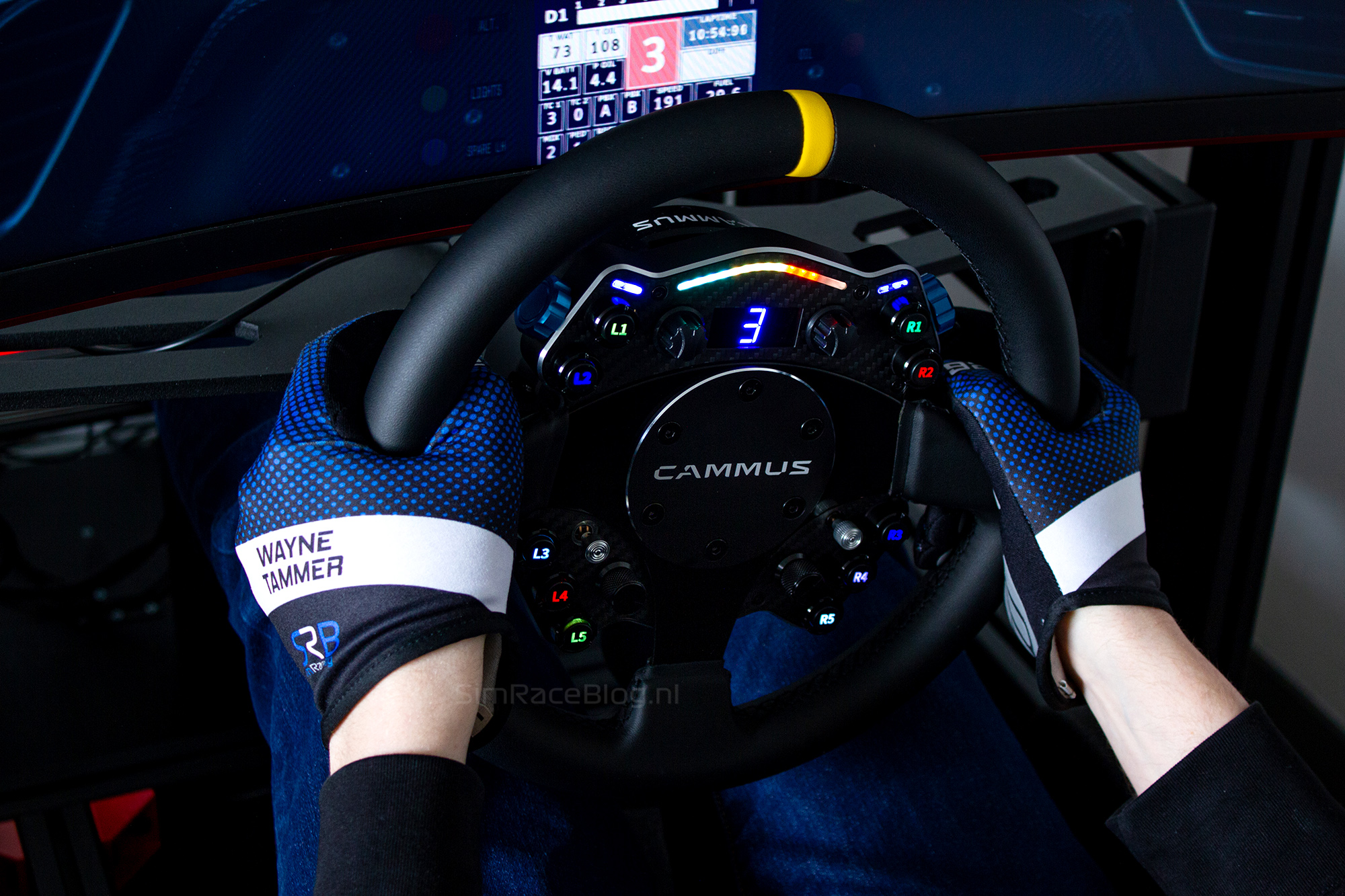

The last aspect on the wheel is the visual feedback in the form of LED lighting and the display. In our opinion, the RPM LEDs and the flag LEDs feel a bit out of place on the C12 steering wheel. While everything else on this wheel has a nice high-quality appearance, the LED lighting feels like it was rushed. When the LEDs light up, they give us a somewhat cheap impression because we can clearly see the small bulbs glowing through a somewhat matte transparent strip. Using the same system as on the Cammus C5 or a neater cover plate to distribute the light from the diodes more evenly would make a big difference. However, this is a minor point that does not detract from the overall use of the wheel. What bothers us a bit more is the control of the visual feedback. The flag LEDs constantly glow in a blue color that cannot be adjusted or changed anywhere, making it more like decorative lighting than functional lighting. When we look at the RPM LEDs, there is a bit more flexibility. In addition to the fixed presets, each LED can be assigned its own color of choice. However, the moment they light up cannot be adjusted, resulting in a discrepancy between the lighting as displayed in the sim and how it appears on the wheel for some cars. We also get a similar rushed feeling with the display in the center of the wheel. It works well when displaying speed and is clearly readable. However, the sloppiness arises when we choose to display the gears. When the car is in neutral, the display shows “0”. If we go one step further and put the car in reverse, we see “-1” displayed on the screen. While the rest of the wheel is well-executed, we find these points disappointing as they give the impression that finishing the wheel was done in a hurry. However, a positive point is that all these issues can be addressed through software updates and are not hardware-related flaws. With a good update, the entire visual experience of the wheel could take a significant quality leap, and we hope that this is something Cammus is working on.


Conclusion
All in all, we are once again impressed by what Cammus has brought to the market with the C12 Direct Drive Steering Wheel. They make a clear statement in the sim racing world with this innovative wheelbase and steering combination, undoubtedly putting pressure on the competition.
From the moment we received the product, Cammus impressed us with a premium presentation, featuring a sleekly designed box housing the product. The steering wheel itself exudes high-quality craftsmanship. The easily attachable 12Nm wheelbase feels powerful and responsive, especially after some adjustments in the user-friendly software, ensuring ample torque to prevent any clipping. Additionally, the steering wheel is packed with input options, including sturdy buttons, multifunctional rotary encoders, and two joysticks, all thoughtfully placed and pleasant to operate.
However, there are a few points of attention with this set. For instance, including the fan but not the table clamp required to mount it is a bit disappointing. Additionally, we feel that Cammus’s handling of the lighting and displays on the steering wheel is somewhat sloppy, with the flag lights being unusable, the RPM LEDs not customizable, and the display showing non-numbered gears as “0” and “-1”. Fortunately, these shortcomings can be addressed in the future with a software update.
All in all, Cammus has delivered an excellent product with the C12 Direct Drive Steering Wheel, which we thoroughly enjoyed reviewing. We are also firmly convinced that sim racers looking for a powerful wheelbase, but not placing great emphasis on changing the steering wheel, should definitely consider the Cammus C12 Direct Drive Steering Wheel. This is especially true because you get a lot of “bang for your buck” at its price point with a solid wheelbase and a qualitative steering wheel.
The Cammus C12 Direct Drive Steering Wheel can be ordered through Cammus’ webshop for a price of $549.00 excluding shipping costs. By using the discount code “SRBCAMMUS,” you can receive an additional 5% discount on the total amount.
Do you want to stay informed about SimRaceBlog content, news, announcements and (future) give-aways? Follow us on Instagram @simraceblognl and/or our Discord channel.


