Gomez Sim Industries GT-MAX32 Steering Wheel
Gomez Sim Industries is a name we’ve been mentioning more often on our blog over time. And in our view, rightly so. Their lineup consists of well-designed products that are built and shipped with a lot of passion and dedication from sunny Texas, where we were welcomed some time ago for a unique behind-the-scenes look.
This time, GSI sent us the GT-MAX32 wheel to test and review. Compared to the rest of their lineup, the GT-MAX32 is quite a unique piece. While their other wheels are mainly aimed at virtual Formula and LMP cars, the GT-MAX32 is their only wheel, just as the name suggests, designed specifically for use in GT cars.
The GT-MAX32 from Gomez Sim Industries has a starting price of €1,223.95 excluding VAT, shipping, and any import fees. The price varies depending on the material of the shifter paddles and options such as adding a dual-clutch system.
The configuration we received features the “Sable” colorway and two aluminum shifter paddles, and is available for roughly €1,535.00 including VAT, shipping, and import fees.

Packaging & Contents
We received a standard brown shipping box through DHL, containing a sleek matte black product box with GSI branding, but without an image of the wheel. We open the lid of the box and see a turquoise-colored interior with the print ‘Welcome to the GSI family’ as a warm greeting. A nice detail that always gets us excited.
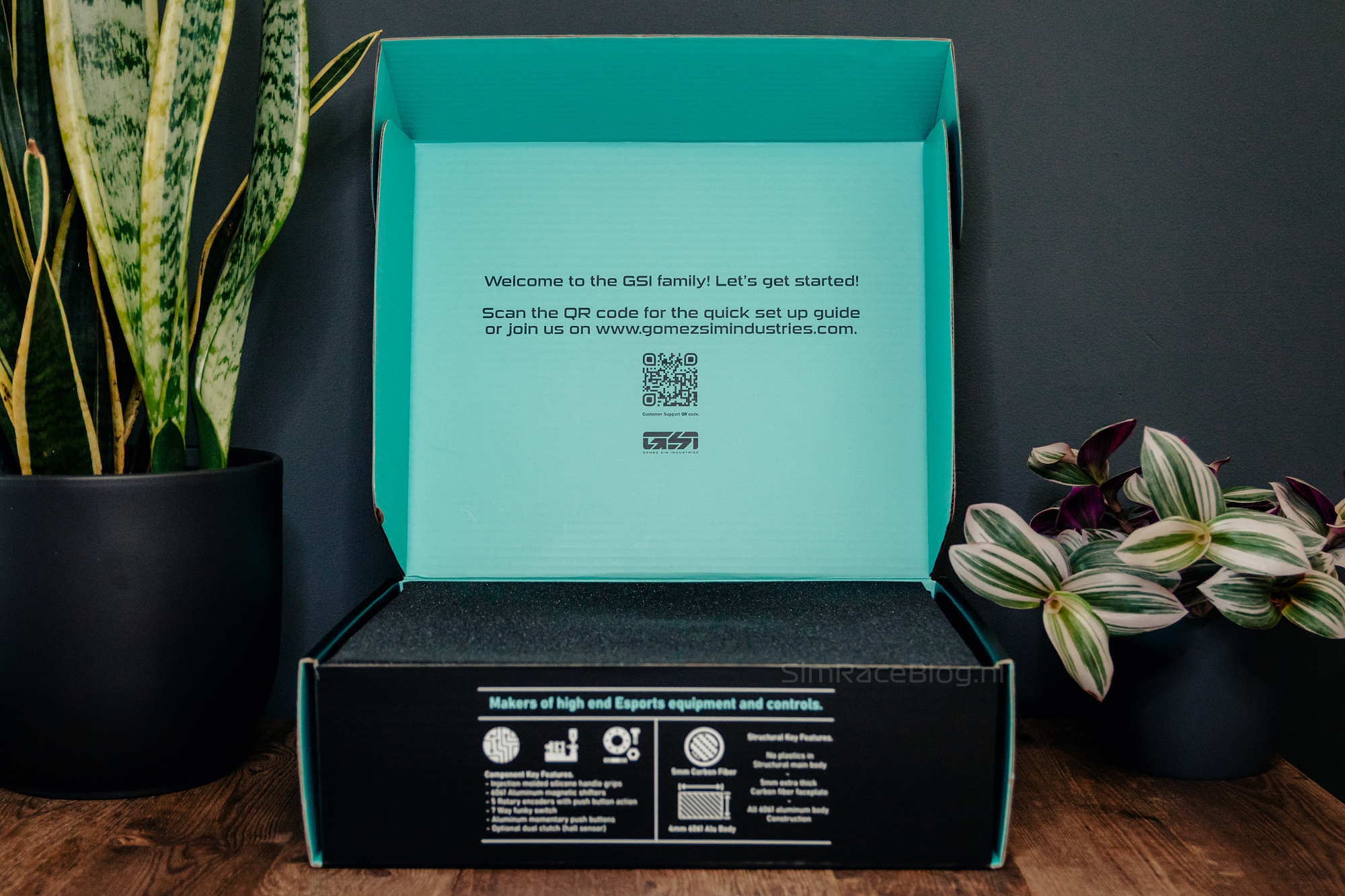


After opening the box, we see a thin black layer of foam. Once we remove it, the GT-MAX32 wheel sits in a precise cutout of more black foam, with a velvet-like top for an extra luxurious feel, waiting for us. The USB cable is also included in the box. Nothing else comes with the wheel; no physical manual or QR code for a digital guide, and no mounting hardware. We are used to Gomez Sim Industries’ minimalist approach, so this is no surprise. The wheel is, of course, the most important part, and it is nicely and safely nestled in the box. Altogether, a solid unboxing experience!


Engineering & Quality
Our experience with Gomez Sim Industries is that they like to produce their wheels using high-quality materials and components. The same applies to the GT-MAX32 wheel. The foundation of the wheel is an aluminum unibody, finished with carbon fiber over the front plate and the entire rim, all consisting of a single continuous piece of carbon fiber. This naturally provides not only extra stiffness but also the classic carbon fiber look that many car enthusiasts love. GSI states that every wheel is handmade, meaning the carbon fiber is also hand-laid. This makes the pattern on each wheel unique, but it can also result in minor production irregularities. While other manufacturers, and perhaps some simracers, might see this as imperfections, GSI considers it a sign of their handcrafted product. We appreciate seeing this craftsmanship and that GSI fully stands behind their product and philosophy. The GT-MAX32 wheel is 320mm wide and finished with velvety soft silicone grips molded over the carbon fiber rim.
In terms of inputs, the wheel lacks nothing, as the most complete configuration offers up to 58 input options.


Front side
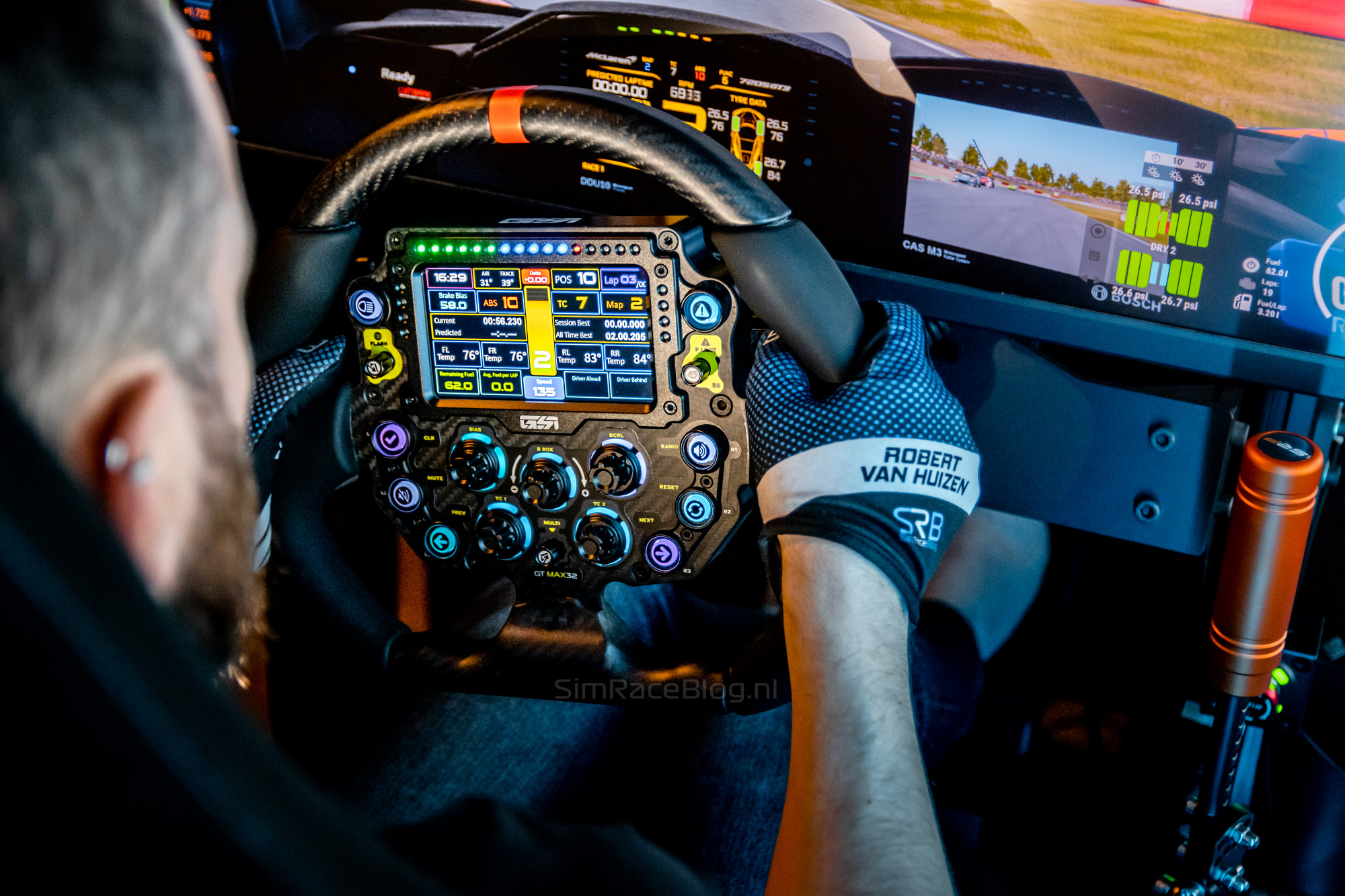
The steering wheel is equipped with eight standard polycarbonate push buttons with an actuation force of 500 grams, four placed on the left side and four on the right side of the wheel. On the left, right, and bottom of the wheel, there are three 7-way switches, commonly known in the simracing community as ‘funky switches’. This means they can be moved up, down, left, and right, and can also function as a rotary encoder and as a push button. In the center of the wheel, there are five 5-way rotary encoders. These can be rotated left and right, pressed, and also rotated while being pressed.
At the front of the wheel is a 5″ touchscreen, though we could not find detailed specifications for it. Above the screen are sixteen RGB LEDs that serve as rev lights. To the left and right of the screen are another two sets of four RGB LEDs each, used for flags, a spotter, and optionally telemetry data. The wheel’s push buttons and rotary encoders also have RGB LEDs, meaning the wheel features a total of 76 usable RGB LEDs.
Rear side
On the back of the GSI GT-MAX32 wheel, we find the hub for a quick release with a standard 70mm bolt pattern using six M5 screws. When ordering the wheel, you can choose which hub or adapter you want installed, and whether GSI should install it for you. The USB cable connection is also located on the rear.
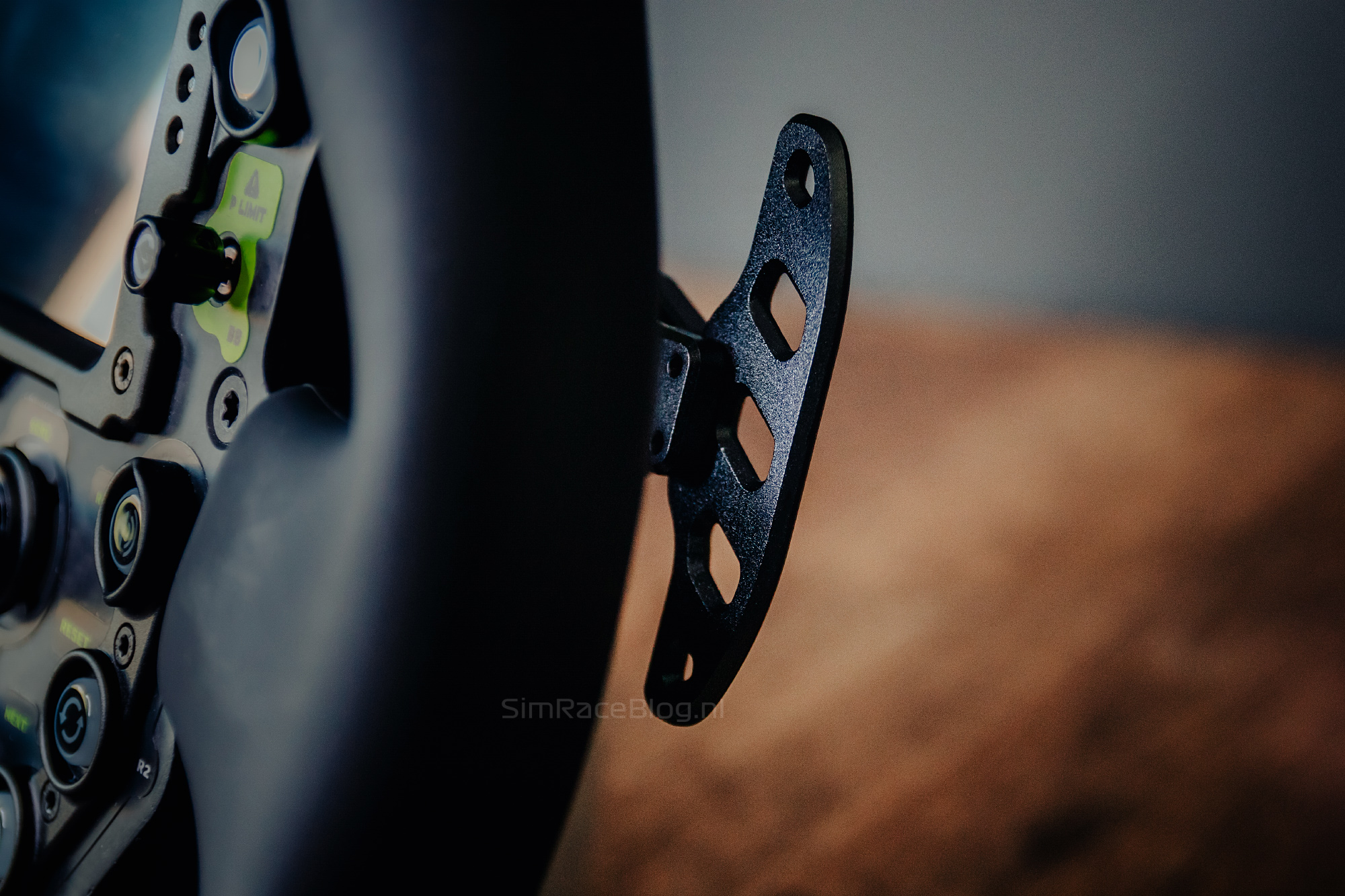
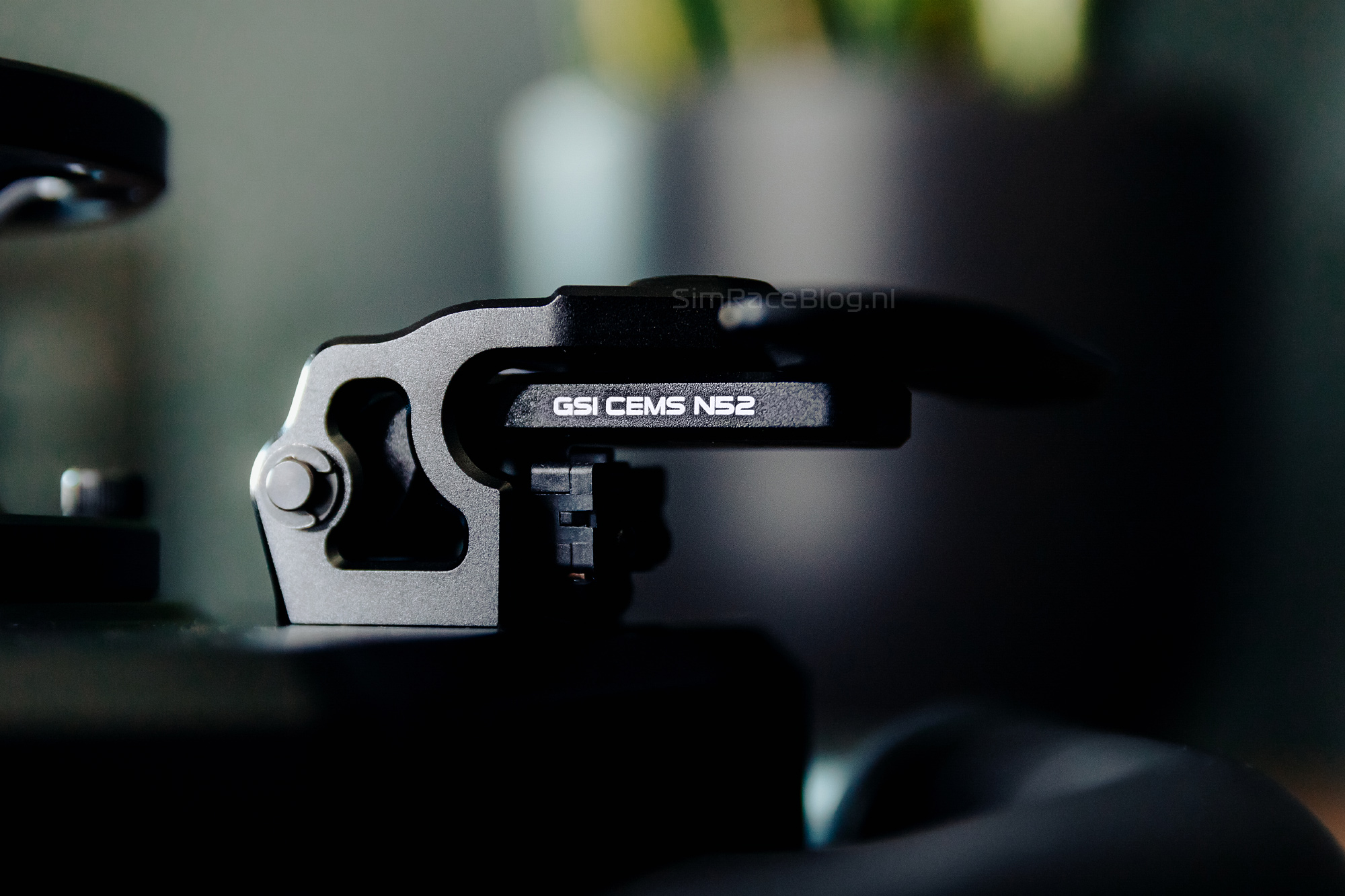
Arguably the most important part of the back of a wheel are the shifter paddles. At the height of our middle fingers, we see two shift modules of the type GSI CEMS N52, as Gomez Sim Industries calls them, which we have seen used on previous GSI wheels. These are magnetic shifter modules equipped with strong N52 neodymium magnets for a fast, smooth shifting experience. Our paddles are made of aluminum, but they can optionally be configured with carbon fiber paddles. Also optional is a dual-clutch system, which is not present on our GT-MAX32 sample.
The GSI GT-MAX32 wheel is PC-only and is compatible with most common wheelbase brands with corresponding QR systems, such as Simagic, Asetek, Simucube, Fanatec, and more.



Mounting
We are going to use the GSI GT-MAX32 on our TREQ Ace, which is equipped with a Simagic Alpha Ultimate wheelbase. The quick release we mount on the wheel hub is therefore one for the Simagic wheelbase. As mentioned earlier, no mounting hardware is included. In our case, the screws that came with the Siamgic quick release are too short. We didn’t have suitable alternatives on hand, so we ordered a set of 5x14mm Allen screws online. On one hand, we appreciate GSI’s minimalist approach, but in cases like this, it’s frustrating to find that you can’t proceed with using the wheel right away.
After a few days, the screws arrived, and we were able to mount the wheel. Piece of cake, as far as we’re concerned. In no time, the quick release was attached to the GT-MAX32 hub, and we were nearly ready for the first meters on the virtual asphalt!


Software
Gomez Sim Industries provides a clear and visually appealing manual for the GT-MAX32. We personally find it a pity that the Owners Manual was not included in the box with our wheel, but fortunately, it is also available on the product page. As mentioned, the wheel can be controlled with GSI’s own simOS App as well as through SimHub. We are going to test both methods and start by downloading the simOS App from GSI’s website.
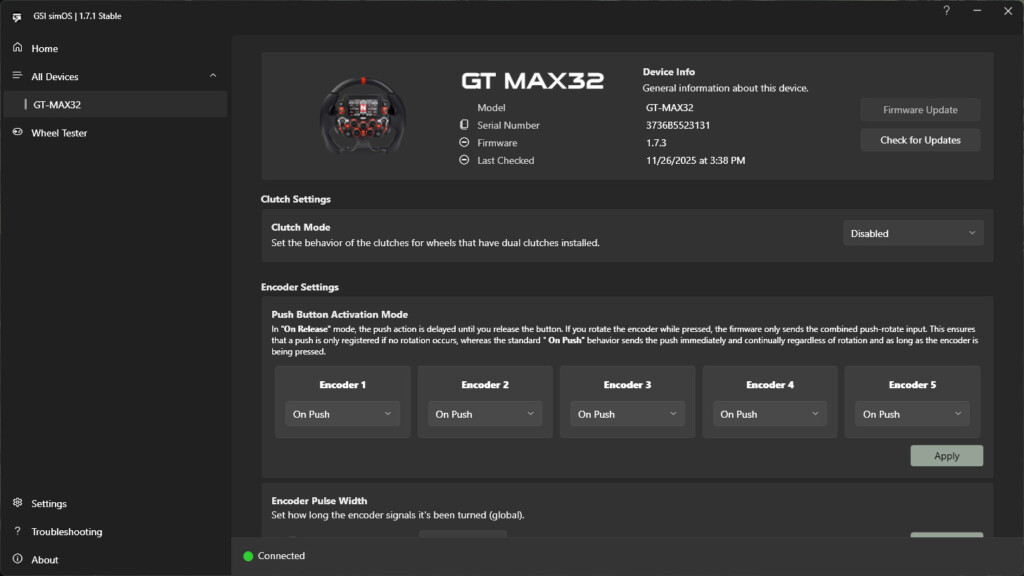
When we open GSI’s simOS app, we see a sleek, minimalist interface. On the Home screen, several products are highlighted. On the left menu, there is a tab for the GSI GT-MAX32, which is immediately recognized, and a ‘wheel tester’ tab. In the GT-MAX32 tab, we first see options to update the wheel’s firmware, set the mode for any clutch paddles, and configure whether a rotary encoder registers input on press or release. There is also the option ‘Encoder pulse width,’ which allows you to determine how long an input is registered. This can improve responsiveness in a game and prevent a button from being activated multiple times unintentionally. Finally, there is the option to adjust the LED brightness.



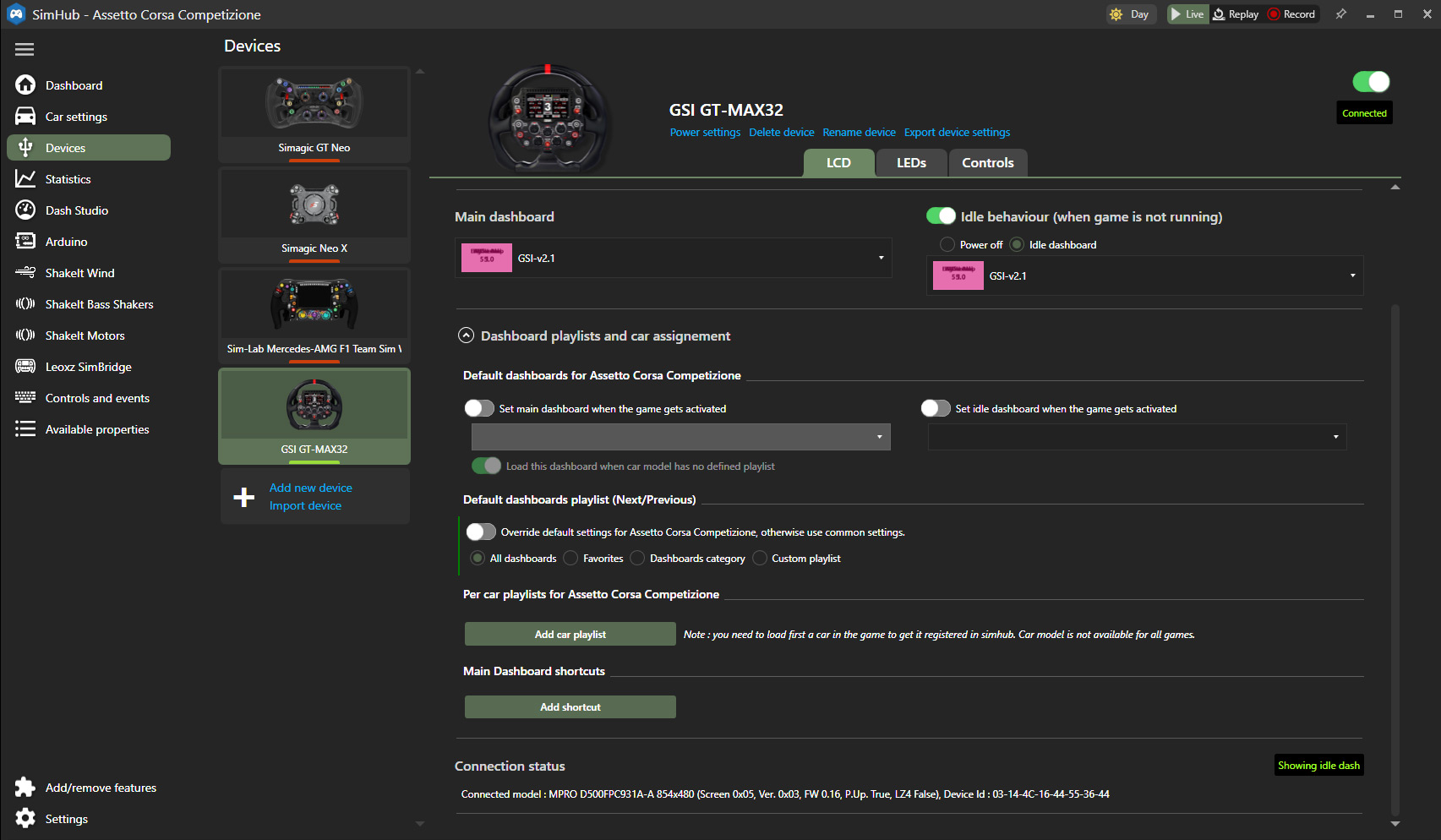
SimHub goes a lot further than the simOS app. For us, SimHub is therefore not new. We can simply assign the GT-MAX32 wheel via ‘My devices,’ after which the wheel is immediately recognized and fully functional. Opening the GT-MAX32 screen gives us several tabs with information.
The ‘LCD’ tab focuses on the 5″ touchscreen on the wheel. Here, the screen brightness can be adjusted, and a dashboard template can be selected. We choose our preferred GSI dashboard for both the ‘idle’ and in-game display. Additionally, specific dashboards can be assigned to specific cars.

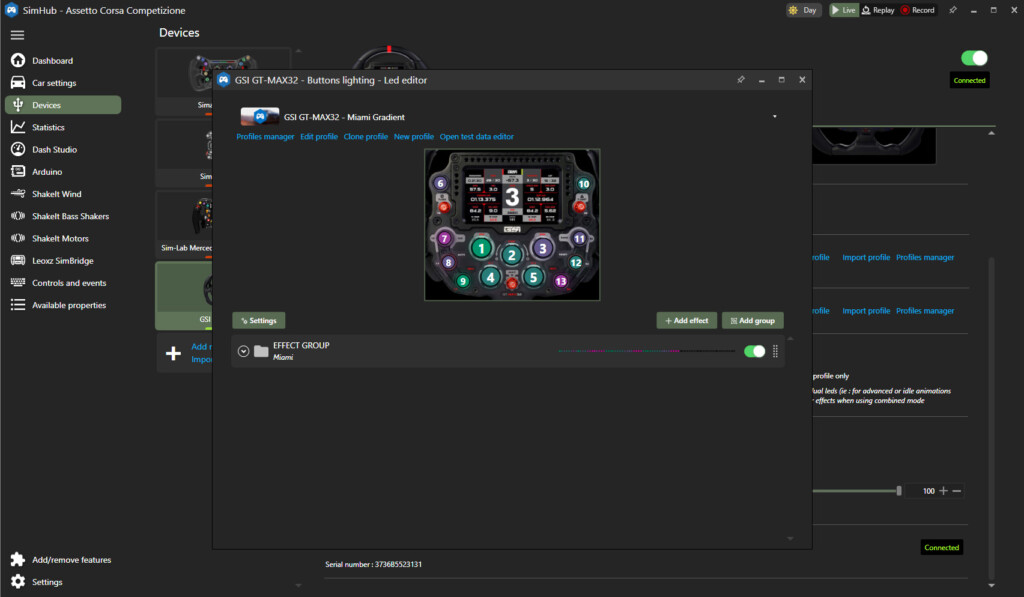
The ‘LEDs’ screen focuses, unsurprisingly, on all the RGB lighting on the wheel. Here, the brightness of the lights can be adjusted to start with. Several preset color schemes are also offered as a starting point, or for the simracer who doesn’t want to set up their own profile. These presets can be further customized, or an entirely new LED profile can be created. This can be done using all standard parameters and based on telemetry data, as we are used to with SimHub. GSI also provides a number of color profiles on their website, both for standard colors and telemetry-based setups. We download and install these profiles and plan to use them.


Finally, we see the ‘Controls’ tab, where we can set up shortcuts for functions such as selecting a dashboard screen when multiple are available, and adjust the screen brightness ‘on the fly’ using wheel-mounted shortcuts.

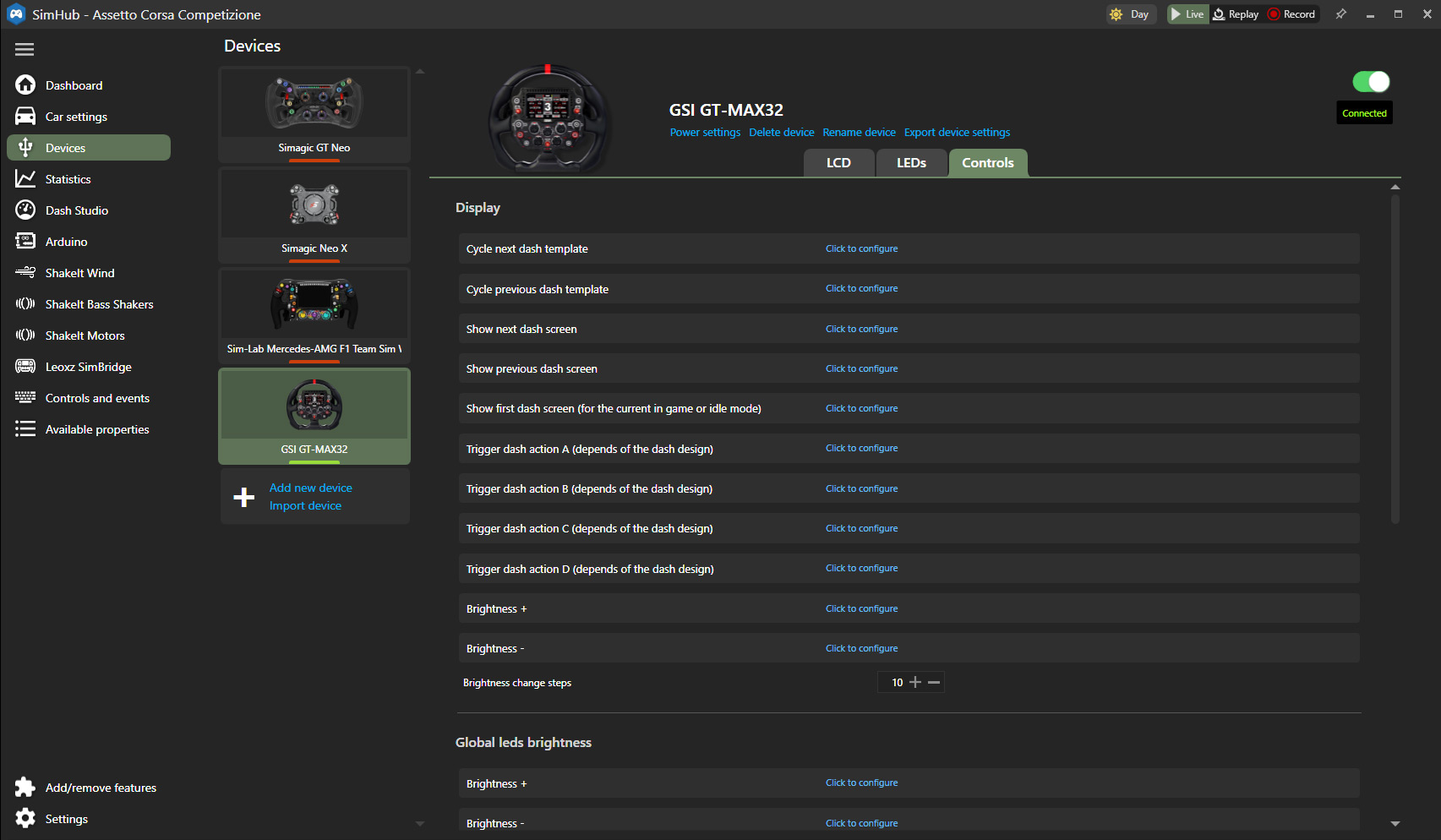
All in all, we find the simOS app a bit limited, seeing its main value in updating firmware and setting options like encoder pulse width. For the actual control of the wheel, adjusting LED profiles, and selecting dashboards, SimHub is essential. This is also how we manage most of our wheels.
With the GSI GT-MAX32 fully updated and configured, we can finally put the wheel to the test!
Driving with the GSI GT-MAX32 steering wheel
We are going to test the GSI GT-MAX32 wheel in Assetto Corsa and Assetto Corsa Competizione. With the wheel ready to use, we just need to assign the buttons and shifter paddles in-game, and we can take our first laps on the track!

When we first unbox and hold a wheel, we always get an initial impression, but once it’s mounted on the wheelbase in the sim, that’s a whole other experience. Sitting in our seat, the very first impression is that the GT-MAX32 feels very solid and ‘believable,’ partly thanks to its 320mm diameter. By that, we mean the wheel has a good size and some weight, and isn’t too compact. When we’re actually driving, the wheel really feels like a true extension of the virtual car.


The grips are a good size, but definitely not too thick. They provide a firm hold, making it easy to guide the car through corners. We personally like to drive with gloves, and the grips offer plenty of traction in that case. Without gloves, the GT-MAX32 is just as comfortable, the grips feel very soft, and even with bare hands we have plenty of control and ease while steering. The seams on the sides of the grips are noticeable, but not overly distracting without gloves. With gloves, the seams are practically unnoticeable.
During our race sessions in different cars and conditions, we notice that the wheel itself feels stiff and responds predictably. Despite its size and weight, the wheel feels very balanced. Even when we reduce the torque on our Simagic Alpha Ultimate wheelbase, the wheel remains easy to handle, though the finer details are slightly less pronounced compared to a smaller or lighter wheel.


Front side operation
Besides the grips, the buttons and other input options on the wheel are of course just as important. As mentioned, the number of inputs on the front of the wheel is more than sufficient. When actually driving, we do notice that, because it’s a fairly large wheel, the buttons are positioned further from our thumbs than expected. This means we almost always have to slightly release our grip on the wheel to press a button. This applies to both the standard push buttons and the ‘funky switches.’ We wouldn’t call it a major drawback; it’s largely inherent to a wheel of this size, which is actually one of the wheel’s strengths.
The push buttons on the GSI GT-MAX32 are pleasant to use, as we’ve come to expect from GSI. They have a short travel and nice clicky feedback. Each button has its own raised collar, making it almost impossible to press another button by accident and making it easy to locate the button by feel. In general, the buttons are spaced fairly far apart, and thus a bit distant from the thumb. Moving quickly from one button to another can take slightly longer than desired, which isn’t ideal in the heat of the moment. That said, they are simply very comfortable and responsive push buttons to use.


We really like the three funky switches on the wheel. We mainly use them to scroll through menus or navigate an MFD or HUD in games like Assetto Corsa Competizione. The funky switches have a pleasant resistance, a nice clicky feel, and feel very responsive. Pressing and rotating the switch works flawlessly, everything you’d expect from a funky switch.
Then there are the five centrally placed rotary encoders on the wheel. Naturally, we have to completely remove our hands from the grips to operate these. The resistance when turning the encoders is perfect for us—not too heavy, but certainly not too light. The feedback with each rotation is also excellent. For us, it’s no problem to adjust traction control or brake bias on the fly using these rotary encoders. Pressing the encoders works the same as a regular push button, and this also feels good and predictable, with pleasant resistance and feedback.

At the very center of the GSI GT-MAX32 wheel is, of course, the screen. At 5″, it has a nice large size, slightly bigger than what we often see on steering wheels. It’s a beautiful display with good sharpness, black levels, contrast, and color saturation. The screen is touchscreen, but in practice, we still prefer using buttons to navigate a screen, whether in-game or on the wheel itself.
A minor downside is that the screen sits relatively deep in the wheel, or that the raised edge sticks out quite far. This makes it hard for us, sitting relatively close to the wheel, to see the corners of the screen, as they are partly blocked by the wheel housing. Simracers who sit further back or have the wheel positioned higher will experience this less often. The 28 LEDs around the screen for RPMs, flags, spotter, etc., are excellent. They offer vibrant colors and good brightness, can be dimmed if needed, and are easy to read while driving.
All in all, the front-facing input options feel high quality, as we’ve come to expect from GSI.
Rear side operation
In the case of the GSI GT-MAX32 wheel we tested, it comes only with the two GSI CEMS N52 shift modules with N52 neodymium magnets. These shift modules feel and operate as we’ve come to expect from other GSI wheels. They have a short travel and nice feedback. The resistance provided by the N52 magnets is very comfortable. Generally, we prefer magnetic shift modules to be slightly heavier rather than too light, and these strike the perfect balance for us. With these modules, it’s easy to shift up or down quickly without missing a shift. Throughout all our sessions, the modules simply feel good and predictable. For us, they are a pleasure to use.



Conclusion
Gomez Sim Industries has delivered another high-quality wheel with the GT-MAX32, this time with clear GT-focused ambitions. The aluminum/carbon fiber unibody gives the wheel both stiffness and an authentic look. Minor imperfections may occur, as visible in our unit with the hand-laid carbon fiber around the wheel, but for GSI, this is a sign of handcrafted workmanship that adds character to the product. With this approach, we can only agree.
Ergonomically, the GT-MAX32 is a solid wheel for intense GT sessions. At 320mm in diameter, it has a believable size for a wheel. The silicone grips feel velvety soft while providing excellent grip, both with and without gloves. The seam in the grips is noticeable but not intrusive. The wheel’s relatively large size and weight may make finer feedback details slightly less pronounced, but it also gives a solid, substantial feel during racing.
With up to 58 input options, the wheel doesn’t lack functionality. The eight polycarbonate push buttons are pleasant to use, with short travel and clicky feedback, and the raised collars around each button prevent accidental presses. Due to the wheel’s size, the buttons are slightly further from the thumbs, which can sometimes feel inconvenient in the heat of the moment. The funky switches are exactly what we hope and expect from a funky switch, and the GT-MAX32 has three of them. The five central rotary encoders also meet all our expectations, offering clear feedback and a very enjoyable user experience. The GSI CEMS N52 magnetic shift modules provide quick, predictable shifts and are an absolute pleasure to use.
The 5″ touchscreen offers excellent image quality but sits a bit deep in the wheel, causing the corners to be partially obscured in a tight seating position. The extensive RGB lighting and RPM LEDs perform excellently. Software-wise, simOS is functional but fairly basic; if you want to fine-tune everything and create telemetry-driven profiles, SimHub is the practical choice. Mounting and accessories follow GSI’s minimalist philosophy. Due to the lack of mounting hardware or a manual, we had to source and purchase 5x14mm screws ourselves.
All in all, the GSI GT-MAX32 feels like a powerhouse for intense GT work in our sim. For the simracer seeking a high-quality GT wheel that delivers good immersion, a wide range of features and inputs, and top-tier shift modules, the GT-MAX32 is definitely worth considering.
With a starting price of €1,223.95 excluding VAT, this GSI wheel sits in the high-end segment. The Sable configuration we tested with aluminum paddles comes in at around €1,535.00 including VAT, shipping, and import fees.
Do you want to stay informed about SimRaceBlog content, news, announcements and (future) give-aways? Follow us on Instagram @simraceblognl and/or our Discord channel.