GRID by Sim-Lab Porsche 911 GT3 Dash Display
GRID Engineering, run by Brandon Cawker, is no longer a name that is unknown in the simracing world. They are best known for their high quality dash displays. Since September 2021, GRID Engineering and Sim-Lab have joined forces by continuing as GRID by Sim-Lab with Sim-Lab owning 100% of GRID and Brandon still being the product engineer. Since September 2022, the company has been able to obtain the official Porsche license for 3 years, which bodes well for us simracers. As a result, we are now seeing more and more beautiful products appear on the market, such as the Porsche 911 RSR Steering Wheel and the Porsche 911 GT3 Dash Display. We have been in a good relationship with Sim-Lab for a while and we were asked to do a review of these beautiful products. Of course we are curious about them and we obviously won’t say no to this.
The Porsche 911 GT3 Dash Display is an add-on that you can mount on your wheelbase so that it sits behind your wheel. It is an external screen that can accurately display telemetry data, for example about the car, your lap times and the track. The Porsche 911 GT3 Dash Display is available through the GRID by Sim-Lab webshop and at the time of writing you pay € 599.00 for the unit.

Packaging & Contents
Our package was neatly delivered by UPS within 2 working days. We received a white outer box containing a beautifully finished black box with the image of the Porsche 911 GT3 Dash Display on it. As soon as we open the box we find the display well packed and protected in black foam. Next to the display we find a box containing the adapter. In the second layer of the box we find a remote control, an HDMI cable, a USB cable, a bag of screws and two carbon adapters for Fanatec and Simucube. We were are already used to Sim-Lab sending a beautiful package with ditto content, yet this GRID by Sim-Lab packaging is an even higher level as far as we are concerned!


Porsche 911 GT3 Dash Display
Our first impression; what a huge screen this is! We mean that in a positive sense, of course, and as far as we’re concerned it says a lot since we’re used to them. The Porsche 911 GT3 Dash Display is a replica of the screen used in the 992-gen Porsche 911 GT3 Cup race car. Immersion at its best, especially in combination with the Porsche 911 RSR Steering Wheel which we get the chance of reviewing later. As mentioned earlier, the screen is officially Porsche licensed.
The base of the screen consists of a housing machined from a single piece of aluminum containing a 10.3-inch LCD screen. The LCD screen is protected by hard glass with the Porsche logo printed on it. The screen is full size like the one in the race car and has a resolution of 1920×720 pixels, a frame rate of 60 FPS, a contrast ratio of 1000:1 and 24-bit true color. Furthermore, the screen is equipped with 24 full RGB LEDs, 16 of which are at the top and 4 on both the left and right side. Right below the screen is the HDMI connection, the connection for the power supply and a USB connection. On the left side of the screen you can find the infrared sensor for the remote and a power LED.
The display works with the well-known SimHub software, making it adaptable for any PC-based racing simulator. You can use this display in Assetto Corsa, iRacing, rFactor2, Assetto Corsa Competizione and any other game/sim you can control with SimHub. The display is compatible with the wheelbases of Simucube 1, Simucube 2, VRS, OSW, Fanatec, Accuforce and Simagic.


Assembly & Use
We are going to mount the Porsche 911 GT3 Dash Display on our Fanatec DD Pro wheelbase, the mounting of this unit is quite straight forward. With the supplied carbon adapters and screws you can mount the display on your wheelbase. First you screw the adapter on the back of the dash display and then screw the whole thing onto your wheelbase. Then plug the HDMI cable, the power cable and the USB cable into the dash display. The HDMI cable has an angled and straight connector where the angled connector will have to go into the dash display, however, if you have the dash display in the lowest position, as we have, it will not fit because our Fanatec wheelbase is in the way . Fortunately, cutting off a small corner of the connector or turning the cable around solves this problem. We chose the first option so that all cables run nicely to the back.


After mounting we boot our PC to configure the dash display in SimHub. It is important to always install the latest version of SimHub so that you can optimally enjoy all the latest developments and novelties. Thanks to the HDMI connection, the Porsche 911 GT3 Dash Display functions as an extra screen/monitor for your PC and is recognized as such by Windows, therefor the configuration works slightly differently than, for example, a Sim Dash. There is a manual for this on the GRID by Sim-Lab website and a dashboard template and LED profile are also available. After you have downloaded the dashboard template and LED profile you can import both into SimHub. After this, select the template dashboard, click on start, select ‘on specific monitor’ in the pop-up and select the new (added) monitor. In the LED tab you choose the right LED profile and the Porsche 911 GT3 Dash Display is ready for use.


We ourselves like to drive the Porsche 911 GT3 Cup (992) in Assetto Corsa Competizione, the ideal combination to put the dash display to use. Together with the Turn Racing R320 steering wheel, this is a perfect combo for us. Our first impression is immediately good and we really get a ‘how cool is this’ feeling! We were already quite impressed by the size of the dash display and as soon as the telemetry data appears, our enthusiasm only increases. The screen shows all the information you want to see through the GRID by Sim-Lab template dashboard, so you don’t have to build anything yourself or search the internet for the right template.
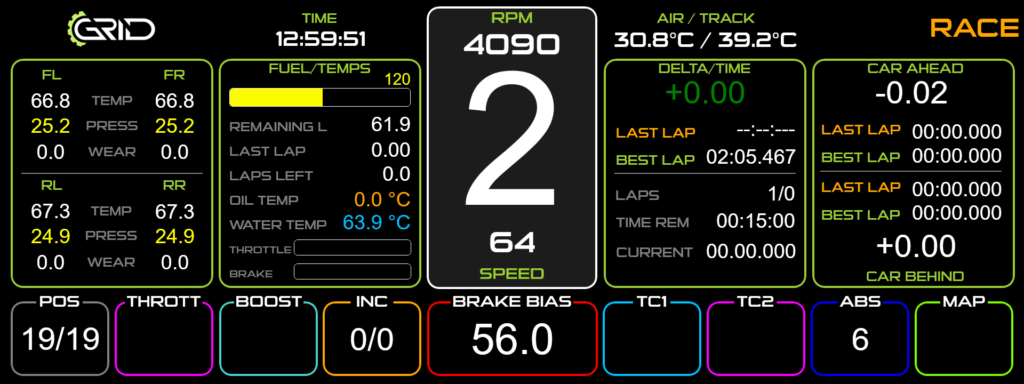
Due to its size, you can position the dash display very nicely in your field of view so that it sits just within the cockpit of your virtual race car, in our case the Porsche 911 GT3 Cup (992), and it does not hinder you at all. This makes the dash display very easy to read while racing, especially in combination with our Turn Racing R320 wheel since it is open at the top and has a similar shape to the original Porsche 911 GT3 Cup wheel. But even with a round steering wheel you can easily read the telemetry data. What we notice after using it a few times is that the backlight of the screen is a bit bright in the first few minutes and needs to warm up, so the black on the screen is not immediately completely black. The screen therefore needs a few minutes to warm up for optimal use. Besides that, we cannot find any negatives.
Conclusion
If you go for immersion and want the ultimate Porsche experience on your simrig, then the Porsche 911 GT3 Dash Display is a must have! But even if you just want a display on your simrig, the Porsche 911 GT3 Dash Display is definitely worth considering. The dash display, mainly due to its quality and size, gave us the ultimate dashboard feeling as you get in a real world (racing) car. You get a lot of valuable information on your display during sim racing. The dashboard template and LED profile designed by GRID by Sim-Lab are an absolute plus, this saves you time from building a dashboard yourself or from searching the internet and you can get started right away. It’s difficult to say something negative, but if we have to mention a negative point, then the HDMI cable is a bit uncomfortable to use. We had to make this angled connector suitable for use at the lowest setting in combination with our Fanatec wheelbase. However, this feels like nitpicking, because the Porsche 911 GT3 Dash Display is a real pleasure for us to have on our simrig!
As mentioned earlier, we can review the Porsche 911 RSR Steering Wheel later, we are very much looking forward to using it together with the Porsche 911 GT3 Dash Display the ultimate Porsche experience on our simrig!
The Porsche 911 GT3 Dash Display is available through the GRID by Sim-Lab webshop and costs € 599.00 excluding shipping costs at the time of writing.
Do you want to stay informed about SimRaceBlog content, news, announcements and (future) give-aways? Follow us on Instagram @simraceblognl and/or our Discord channel.