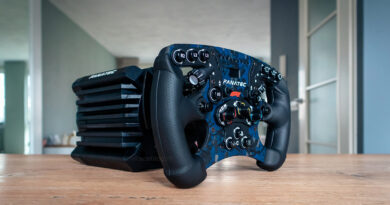
Cube Controls GT-X2 Steering Wheel
As we mentioned in our review of the Mercedes-AMG GT, during our conversations with the Cube Controls team at Sim Formula Europe in January 2024 and the ADAC Simracing Expo in October 2024, we had the unique opportunity to test three of their steering wheels: the Mercedes-AMG GT Edition, the F-PRO, and the GT-X2.
We’ve now reached the third and final review in this Cube Controls series. After testing the Mercedes-AMG GT and F-PRO steering wheels, it’s now time to take a closer look at the Cube Controls GT-X2.
The Cube Controls GT-X2 steering wheel is available through the Cube Controls webshop and, at the time of writing, has a starting price of €1,692.00. Various color combinations are available, as well as a choice between a grip distance of 300 or 320 mm. A separate GT-X2 grip set costs €110.00. All mentioned prices exclude shipping costs. We received the 300 mm version with a black front plate and black hub.

Packaging and Contents
Recently, we received multiple packages from Cube Controls, shipped via DHL Express and delivered within three business days. The products were carefully packed in sturdy brown shipping boxes, ensuring optimal protection during transport.
One of the packages contained the product box for the GT-X2 steering wheel. The other packages included products we previously reviewed, such as the Cube Controls Mercedes-AMG and F-PRO steering wheels. Did you miss those reviews? We definitely recommend checking them out!
The product box features Cube Controls’ signature style: matte black with blue sides and a large Cube Controls logo on the front—a simple yet effective design. Upon opening, a protective foam layer sits on top, displaying the quote “Make It Real”, something we always appreciate. Removing this layer reveals the GT-X2 steering wheel neatly nestled in a foam cutout.
At the top of the product box, there are two small black boxes containing a storage pouch, a Q-conn magnetic connection cable, and a bag with tools, screws, and bolts for mounting a quick release. At the very bottom, we find a detailed sticker sheet.
All in all, a well-packaged and complete set, ready to use!


The Cube Controls GT-X2 Steering Wheel
The Cube Controls GT-X2 steering wheel is a high-end GT wheel designed for serious sim racers seeking a combination of quality, functionality, and style. Weighing 1,480 grams, it features elastomer grips and is available in two sizes—300 mm and 320 mm—catering to different preferences. The housing is made of cast aluminum, ensuring a solid and durable construction. The front plate is crafted from carbon fiber-reinforced polymer and comes in four colors: black, white, green, and red. This not only gives the wheel a premium look but also allows for visual customization to match the rest of your setup.


Frontside
On the front of the steering wheel, there is a 5-inch LCD screen with a resolution of 854×480 pixels. The screen is a touchscreen and fully customizable via SimHub, allowing for real-time telemetry and dashboard data display. Above and alongside the screen, there are 21 customizable RGB LEDs arranged in a 3x15x3 pattern. The 15-segment RGB LED strip at the top of the wheel serves as an RPM indicator, while the RGB LEDs on the sides of the screen can be used for flag signals and notifications.
The wheel also features ten momentary push buttons, five on each side, strategically placed for quick and intuitive operation. These buttons are equipped with RGB lighting, ensuring visibility even in low-light conditions. To prevent accidental presses, three buttons on each side have protective button guards. Between the top two buttons, there are two toggle switches with on/off illumination, one on each side of the wheel.
At thumb level, the Cube Controls GT-X2 is fitted with two multi-directional joysticks that also function as encoders. Above these joysticks, there are two rotary thumb encoders, and below the screen, three additional rotary encoders provide further adjustability.


Backside
On the back of the steering wheel, the aluminum hub is centrally located, featuring a 70 mm bolt pattern compatible with Quick-Release systems or adapters. Positioned at the top left and right are two-way toggle switches for additional input options.
On either side of the aluminum hub, you’ll find the fully aluminum PRO shift modules and a dual-clutch system, both equipped with Hall sensor technology. The shifter modules are fully adjustable in both depth and angle, while the clutch modules can only be adjusted for travel distance. Each module is fitted with 3 mm thick carbon paddles, which are width-adjustable for a tailored feel.
Below the aluminum hub, there’s a connection port for the Q-conn magnetic connector cable, alongside a power button for the steering wheel itself.


Mounting
We attach the Cube Controls GT-X2 steering wheel to our Simucube 2 Sport wheelbase using a Simucube Quick-Release. The steering wheel comes with an aluminum hub, and we mount the Quick-Release using three provided M5 bolts.
Unlike, for example, the Mercedes-AMG GT steering wheel, the Simucube Quick-Release cannot be directly mounted to the GT-X2. This is because the aluminum hub is mounted internally. In theory, it could work, but we’re not going to open up the steering wheel.
Once the steering wheel is on the Simucube wheelbase, we proceed to mount it securely and get ready to connect and configure it.


Software
The Cube Controls GT-X2 steering wheel, unlike the Mercedes AMG and F-Pro wheels, only offers a wired USB connection. We connect the wheel via the USB connector to the PC and the Q-Conn connector on the GT-X2. After that, we can configure the steering wheel using SimHub or Cube Controls’ own software, Cubeset.
SimHub
To use the LEDs and telemetry features, we add the steering wheel to SimHub. This is easy, as most steering wheels are now supported by default. By selecting Cube Controls as the brand and the GT-X2 model, the wheel is instantly recognized. All basic functions work right away, except for the screen. To get that working, we first need to select a dashboard template. Cube Controls provides an excellent default version, which we download and activate.
Additionally, we can fine-tune the RGB LEDs and the telemetry for the buttons and encoders. In SimHub, multiple profiles can be created and customized with telemetry effects and functions. We go with the default profile and adjust the RGB LED colors to our personal preferences.


Cubeset
In addition to SimHub, Cube Controls also offers the CubeSet-app (current version v1.19). This app is only compatible with the latest steering wheel models; older Formula and GT wheels are not (yet) supported.
With CubeSet, we can calibrate the shifters and clutch modules, perform firmware updates, and, in addition to the features provided by SimHub, reset the steering wheel to its factory settings. If the steering wheel supports it, the app also allows us to check the battery status.


Driving with the Cube Controls GT-X2 Steering Wheel
For our test of the Cube Controls GT-X2 steering wheel, we dive into the world of GT cars with Assetto Corsa Competizione (ACC). We take our seat in the Sim-Lab P1-X Pro, with the wheel firmly mounted on the Simucube 2 Sport. After launching ACC, we assign the buttons and encoders to the right functions and we’re ready to race!
This steering wheel is one of our personal favorites within the Cube Controls range, and we are very curious about its performance. The first few meters on the virtual track immediately confirm our high expectations: the steering wheel sits perfectly in our hands and feels comfortable. The grips offer a firm hold, whether we’re driving with or without gloves. The finish is neat; the seams on both the inside and outside of the elastomer are barely visible and not bothersome at all. Even after weeks of intensive use, the grips remain surprisingly clean and don’t become sticky – something we definitely appreciate!
When it comes to build quality, it’s certainly on point. The solid aluminum casing and carbon fiber-reinforced polymer front plate give the steering wheel a robust feel. It may not immediately exude pure luxury, but that’s definitely not a downside. With a compact diameter of 300 mm, it’s perfectly suited for GT cars. While driving, we notice no flex or play, which ensures a reliable and precise steering feel. The force feedback is transmitted in great detail, even when we lower the power of the Simucube 2 Sport wheelbase to below 10 Nm. As a result, the GT-X2 steering wheel is suitable for various wheelbases, from entry-level models to high-end systems.


Operating the Cube Controls GT-X2 Steering Wheel
All the materials used feel premium, from the push buttons to the aluminum buttons on the rotating encoders. The push buttons provide a clear click and satisfying feedback, while the rotating encoders have a firm, tangible click with each step. The buttons and encoders at thumb height are perfectly positioned, allowing us to operate them smoothly without taking our hands off the wheel.
The 7-way switches are cleverly placed at thumb level, so we can easily operate them without losing our grip. They respond smoothly and precisely, ideal for quick and accurate input. When using the 7-way switch as a rotating encoder, we need both our thumb and index finger, requiring us to briefly take one hand off the wheel.
This is also true for the three rotating encoders in the middle of the GT-X2. A nice touch is that these encoders seamlessly work with Cube Controls’ dashboard template. Changes are immediately visible on the screen just above the encoders, making setup intuitive. Of course, other dashboards can do this as well, but here it feels like a well-thought-out and integrated solution.
Another advantage is that all the LEDs on the push buttons and the three central rotating encoders are telemetry-driven. Via SimHub, we can configure the LED lighting of these inputs to display crucial race information, such as flags, the pit limiter, or spotter notifications. The buttons and encoders are blank and can be labeled to our liking using the included stickers.
The 5-inch LCD screen is the perfect size and nicely integrated into the wheel. It remains easy to read while racing and features touch functionality. In SimHub, we can assign touch actions, such as switching between different dashboards by tapping the screen left or right. However, in practice, we find that we prefer using a rotating encoder for these actions.
The brightness and contrast of the screen can easily be adjusted through SimHub. At maximum brightness, the screen remains highly readable, with vivid colors. It supports a refresh rate up to 30 Hz, which is great for smooth telemetry updates. Note: to get the most out of the screen, a SimHub license is required. Without a license, the data is refreshed at just 10 Hz.
The RGB LEDs surrounding the wheel are powerful and display colors exactly as configured. We do dim them to 70%, as they are too bright and distracting when racing. The 3x15x3 LED layout above and beside the screen offers extensive customization options in SimHub. Each LED can be individually linked to specific telemetry data. For example, we use the side LEDs for flag situations and spotter info, while the LEDs above the screen serve as the RPM indicator. SimHub supports this excellently with a variety of ready-made LED profiles and dashboards.


The shifter modules at the back feel solid and premium. They use contactless Hall-effect sensors and are highly adjustable, making them comfortable to operate for any hand size. The switches are positioned at the right height for the middle fingers and provide a satisfying, firm click without being overly loud.
Beneath the switches are two analog modules with slightly more travel. These modules are not adjustable and, in our opinion, are positioned a bit too far back. The spring resistance is strong, making them difficult to operate with the pinky fingers. Using the ring fingers works better, though this obviously depends on hand strength. Thanks to the Hall-effect sensors, there is no friction when operating them. If needed, the settings and calibration can be easily adjusted via the CubeSet software, but everything works as expected out-of-the-box.
Both modules feature carbon paddles that are beautifully finished, with no sharp edges, enhancing the premium feel.


Conclusion
Because the GT-X2 steering wheel is one of our personal favorites within the Cube Controls range, we had high expectations. In our view, Cube Controls has fully met those expectations during this review. While the steering wheel may not radiate pure luxury immediately, it undoubtedly belongs to the higher segment.
The quality of the GT-X2 is excellent thanks to the solid aluminum casing and carbon fiber-reinforced polymer front plate. The grips offer a firm and comfortable hold, suitable for both glove and non-glove driving – even during longer sessions. With a 300 mm diameter and a sleek design, the steering wheel feels natural in GT cars, delivering direct and precise feedback without flex or play.
The buttons and encoders are carefully placed and feel premium, offering precise and responsive operation. The RGB lighting and the 5-inch LCD screen not only add functionality but also elevate the visual experience. Thanks to seamless integration with SimHub, extensive telemetry settings and LED profiles can be easily configured – a major plus for serious sim racers.
The shift modules and analog paddles at the back feel solid and well-thought-out. The switches provide a clear, satisfying click without being overly loud. The analog modules are positioned slightly further back than we’d ideally like and require a bit more force to operate.
In short, the Cube Controls GT-X2 excels in grip, build quality, and functionality. Whether you’re using an entry-level or high-end wheelbase, this steering wheel offers a premium sim racing experience without compromise.
We tested the Cube Controls GT-X2 in combination with a Sim-Lab P1X Pro, Simucube 2 Sport, P1Sim Mistral Pedals, Assetto Corsa, and Assetto Corsa Competizione, and we are very pleased with the results.
Feeling excited after reading our review? The Cube Controls GT-X2 steering wheel is available through Cube Controls’ web store, starting at €1,692.00. Various color combinations are available, as well as a choice between grip diameters of 300 or 320 mm. A separate GT-X2 grip set is available for €110.00. All prices mentioned are excluding shipping costs.
Do you want to stay informed about SimRaceBlog content, news, announcements and (future) give-aways? Follow us on Instagram @simraceblognl and/or our Discord channel.