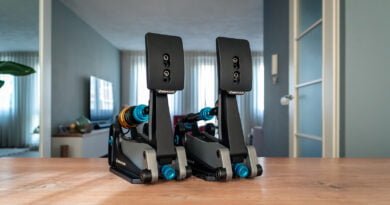
Leoxz XF1 Pro Steering Wheel
Earlier this year, we were given the opportunity to review the XF1 Sport steering wheel from Leoxz, a steering wheel that left us very impressed considering its price point. Since then, Leoxz has not been sitting still and has continued to develop new products. Soon after, they announced the DDU800 display and the XF1 Pro steering wheel. We already have published our review of the Leoxz DDU800 display, and now it’s time for the XF1 Pro steering wheel.
The XF1 Pro steering wheel is an evolution of the XF1 Sport model with several modifications and changes incorporated. We always appreciate seeing manufacturers passionately working on their products to pursue perfection. From our personal standpoint, we are delighted to observe that feedback from the community is taken seriously as well. We feel honored to have received a direct request to test and review the XF1 Pro steering wheel. Considering our enthusiasm for the previous model upon which this steering wheel is based, we immediately accepted the offer.
The Leoxz XF1 Pro steering wheel is exclusively designed for use with a PC and is available with multiple options for paddles at the rear and various Quick Release systems. The base price of the steering wheel starts at €519.95. Depending on the options and Quick Release chosen, this price can go up to €659.95. We received the most comprehensive model from Leoxz, featuring double clutch paddles at the rear and additional optional paddles, but without a Quick Release.

Background
As mentioned, the Leoxz XF1 Pro is an evolution of the XF1 Sport steering wheel. Due to this fact, the two models share many similarities and resemblances, which may lead to some overlap between this review and the one for the Leoxz XF1 Sport. In this review, our aim is to treat the XF1 Pro steering wheel as a new stand alone product. Therefore, we will try to avoid repeating too many aspects of the steering wheel that we already covered in detail in the review of the Leoxz XF1 Sport. Instead, we will make this review comprehensive enough for both readers who haven’t read the XF1 Sport steering wheel review and those who have. Throughout the review, we will primarily focus on highlighting the differences between the two models.

Packaging & Contents
The Leoxz XF1 Pro steering wheel was shipped from China and was delivered to us in 8 days through GLS. We received a standard, brown shipping box containing the white product box from Leoxz. The product box features the outlines of the steering wheel and a summary of the specifications. In fact, the product box is virtually the same as the one used for the Leoxz XF1 Sport, which we previously mentioned isn’t as exciting as some other brands’ packaging. Nevertheless, the packaging is very sturdy and stylish and certainly encourages us to open it up and unpack its contents. That’s exactly what we will do straight away.
Upon opening the product box, the first thing we notice is the sticker sheets placed on a soft layer of black-colored foam. After removing the foam, we find the XF1 Pro steering wheel neatly packed and secured in tightly cut foam, waiting to be liberated by us. Additionally, we find the USB cable, a bag containing a m3 Allen key, and a pair of tweezers to help apply the stickers to the steering wheel. Altogether, we can see that Leoxz has once again taken care to provide a well-organized and neatly presented package.


Engineering & Quality
The Leoxz XF1 Pro steering wheel features a housing made of CNC-machined, black-anodized aluminum, and a 5mm thick front plate made of forged carbon fiber. The steering wheel has the same ergonomics and dimensions as the XF1 Sport, which means it has a width of 275mm. The handgrips on the steering wheel are made of injected polyurethane rubber with a delicate finish, providing a soft and pleasant feel to the touch.
At the front of the XF1 Pro steering wheel, there are fourteen push buttons, whereas the XF1 Sport had fifteen. This is because, compared to the XF1 Sport steering wheel, one push button on the left and the joystick on the right have been replaced by two “funky switches.” These “funky switches” are 7-in-1 switches that can be pressed in four directions (up, down, left, and right) and can also be pushed as a pushbutton and rotated left and right. Additionally, the XF1 Pro retains the three encoders in the center of the steering wheel and two very small buttons underneath the rotary encoders.
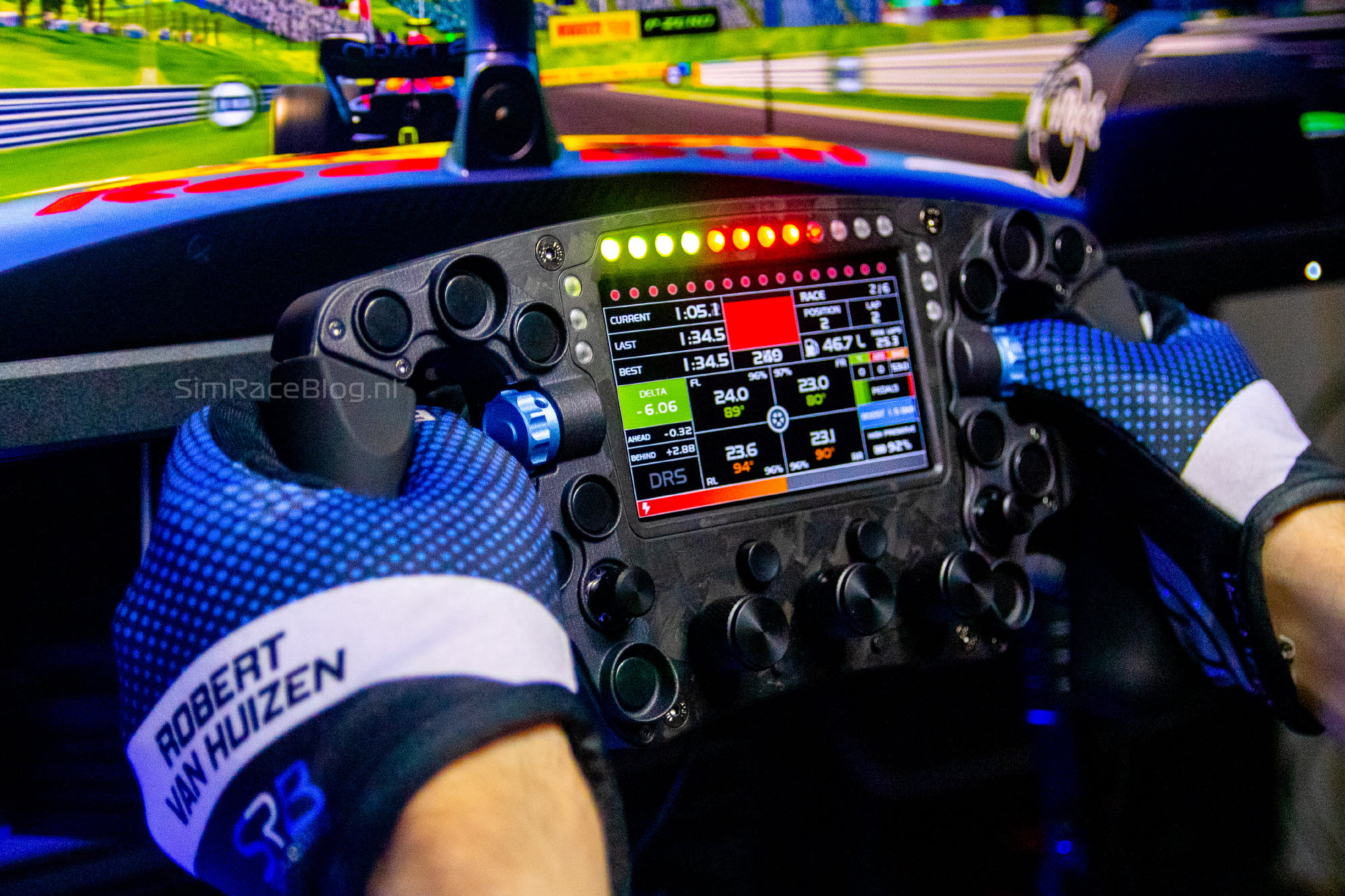
The XF1 Pro steering wheel is equipped with eighteen adjustable LEDs, with twelve above the screen and three on both the left and right sides in a 3x12x3 pattern. The status LEDs, which were diagonally positioned above the flag LEDs on the previous XF1 Sport steering wheel, are no longer present. The screen of the steering wheel has also received a nice upgrade. Where the XF1 Sport steering wheel had an IPS screen with a resolution of 480×272 pixels, the XF1 Pro now features an IPS screen with a resolution of 800×480 pixels. The refresh rate of 60Hz remains the same. Lastly, there are still two blue-colored rotary encoders located near both thumbs as well.


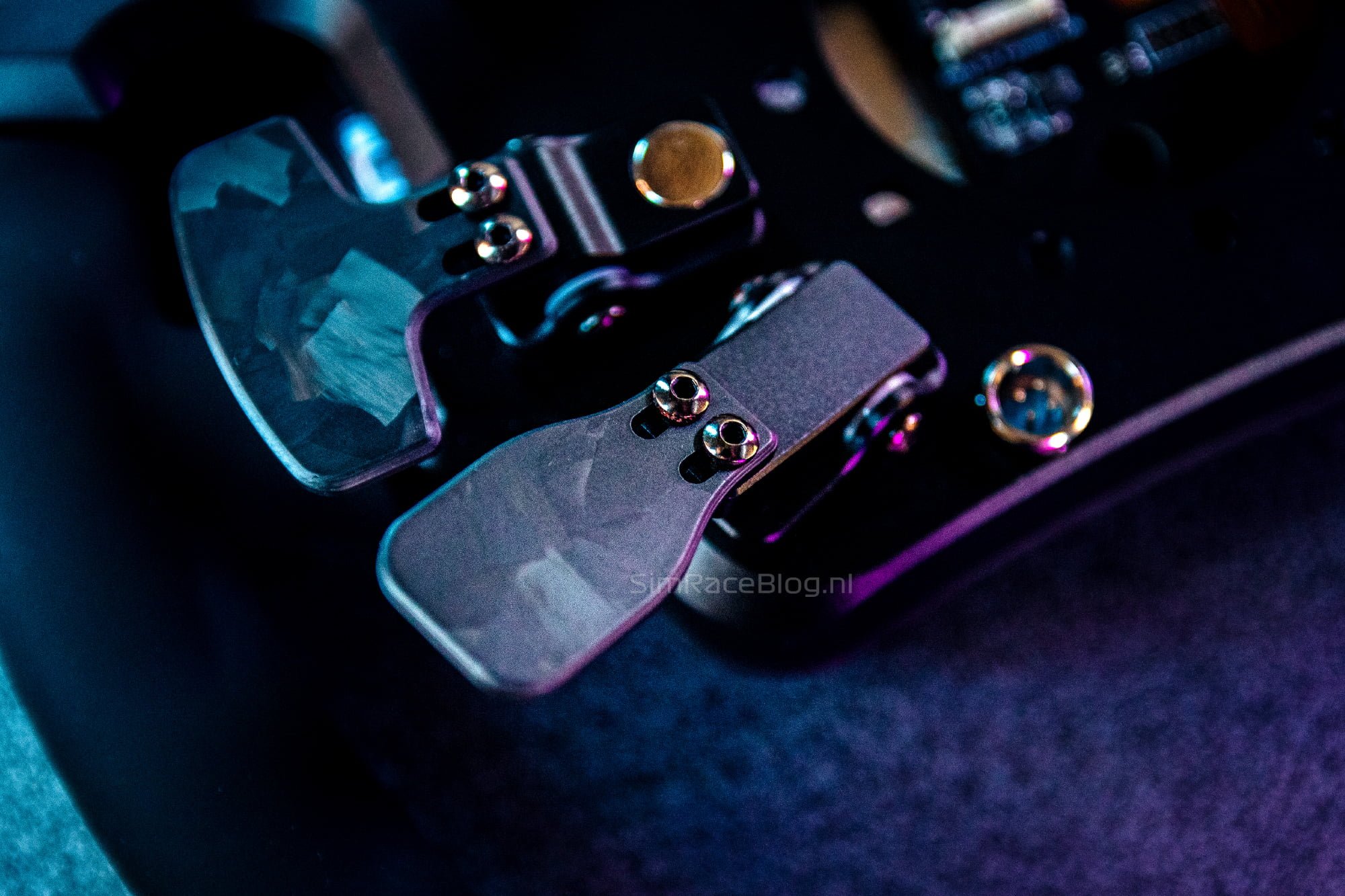
The backside of the steering wheel also has a few subtle changes on board. To begin with, the shifter module paddles, double clutch paddles, and the additional optional paddles are now produced from forged carbon fiber instead of regular carbon fiber. Readers familiar with the XF1 Sport steering wheel might also notice that the Bluetooth antenna is no longer present at the back of the steering wheel. As a result, the XF1 Pro steering wheel can no longer be used wirelessly via BLE (Bluetooth Low Energy), a feature that we were enthusiastic about in the XF1 Sport. The XF1 Pro steering wheel now must be connected to your PC via the USB cable. Similar to the XF1 Sport, all the paddles on the back are equipped with contactless hall-effect sensors, eliminating friction on the paddles. This makes the paddles resistant to wear and, therefore, more durable. The double clutch paddles can be configured as double a clutch, analog input, or button input. The additional optional paddles function as analog modules or as button input. Furthermore, at the back of the steering wheel, there is a connector for the USB-XS9 interface, and once the cable is plugged in, it locks securely. The cable can be disconnected by pulling back the metal ring of the cable and simultaneously pulling the cable out of the steering wheel. Finally, there is a 70mm pattern at the back of the steering wheel for attaching a Quick Release or Adapter.


Mounting
This time, we will be using the XF1 Pro steering wheel on our TREQ One sim rig in combination with the Cammus DDWB Wheelbase. This wheelbase fundamentally utilizes a standard NRG Innovations Quick Release adapter. Since our steering wheel was delivered without a Quick Release, we are using one that we received previously with the previous Leoxz XF1 Sport steering wheel. It’s worth noting that our XF1 Sport came with the Fanatec QR pre-assembled upon delivery, so there is a chance that if you purchase the steering wheel from Leoxz along with a compatible Quick Release, they may deliver it to you already mounted.
To place our Quick Release adapter, we need to separate the front plate of the steering wheel from the back of the housing. This may sound scary to do, but it’s actually quite simple; just loosen all the bolts on the front of the steering wheel and carefully detach the parts. Thanks to the contactless hall-effect sensors of the paddles, we don’t have to worry about tangled cables inside the housing. When separating the back of the steering wheel and exposing the circuit board, we also get a glimpse of the placement of the Hall sensors. Normally, we don’t disassemble products for a review, so it’s an interesting bonus to be able to examine its operation more closely (see photos below). With the backside of the steering wheel’s chassis separated, we can place the Quick Release on the back and secure it from the inside. For this, we use the bolts that came with the Quick Release. Once mounted, we can reassemble the steering wheel, snap it onto the Cammus GT DD wheelbase, plug in the USB cable, and we’re ready to use it!


Software
The Leoxz XF1 Pro steering wheel is fully controlled through SimHub. To enable communication between the steering wheel and SimHub, the Leoxz SimBridge plug-in is required, which can be downloaded from Leoxz’s website. Once installed, a “SimBridge” tab appears in SimHub, from where the XF1 Pro steering wheel can be configured. Since we already had the SimBridge plug-in for SimHub installed, we can simply plug in the steering wheel and start using it right away.
Unlike the Leoxz XF1 Sport steering wheel, on which all dashboards were pre-programmed by Leoxz, the display of the XF1 Pro is now also fully controlled through SimHub. This allows you to download dashboard templates from the internet or even create your own custom dashboards. However, we do find it somewhat disappointing that Leoxz did not include a small number of their own templates with the steering wheel, considering there were some dashboards on the XF1 Sport steering wheel that we found very useful and enjoyable.


In addition to the display, the RGB LEDs are also fully customizable individually. Multiple profiles can be set up so that we can use different settings for the LEDs per car and/or per simulation game. This is very convenient when you want different LED settings for each car you like to drive. The default profile already includes almost all the functions we would like to see on a steering wheel with RGB LEDs. However, within SimBridge, we miss a function that allows us to easily override the “redline” value. It is possible to determine when the individual RPM LEDs will light up in relation to the redline, but if we want to adjust the redline itself, we have to do it through Car Settings in SimHub. After personalizing our RPM LEDs, the only thing we added ourselves is a function that shows whether DRS is available or engaged. With a variety of pre-programmed formulas and conditions, you can configure each LED according to your preferences, making the possibilities quite endless. The fact that you can save and copy different profiles makes it very attractive to experiment with and tailor the settings to your liking.


The functions of the paddles on the back of the steering wheel are also customizable. The paddles are self-calibrating, and the only setting we can adjust here is whether the clutch paddles behave as two individual paddles or as a double clutch. In the latter case, we can also set the engagement point. What’s interesting about the push buttons on the steering wheel is that you can customize the outgoing signal duration in milliseconds when you press a button. This can be useful, for example, when you frequently press buttons in quick succession and need a shorter signal duration. On the right side of the SimBridge screen, there is a list of potential shortcuts that you can keybind to your steering wheel or keyboard.
All in all, the SimBridge plug-in is extremely comprehensive and reasonably well-organized. Configuring the steering wheel is a breeze with it, and experimenting with all the possibilities can easily entertain you for an evening. However, if you simply want to get right into driving, you can do that too. After installing and activating SimBridge, the steering wheel is immediately ready for use.
Using the XF1 Pro Steering Wheel
We are going to test the Leoxz XF1 Pro steering wheel in F1 22 and Assetto Corsa using the RSS Formula Hybrid 2022 mod. It is no surprise that our first impression immediately feels very familiar, as the steering wheel is an evolution of the XF1 Sport, with which we have raced for many hours. The steering wheel feels incredibly high-quality and solid, and we cannot detect any flex in it. One thing we immediately notice is that the handgrips feel just slightly different. In essence, they are as soft and comfortable as those of the previous XF1 Sport model, with the difference that the handgrips of the XF1 Pro feel a tiny bit grainier and less sticky to the hands. This makes the steering wheel, combined with the pleasant ergonomics, very comfortable to use even without gloves. As we mentioned in the review of the XF1 Sport, it is a relatively compact steering wheel, and the space around the thumbs is not very large, with the paddles relatively close to the steering wheel. If you have larger hands, this steering wheel may feel a bit cramped. The steering wheel is noticeably lightweight, it turns very quickly and easily, and details from the wheelbase are well transmitted. Thanks to this lightweight design, the steering wheel is also suitable for wheelbases that are less powerful.


Rear Controls
Apart from the fact that the actual paddles on the XF1 Pro are now made of forged carbon, instead of regular carbon fiber like on the XF1 Sport, there have been no noticeable changes to the modules at the back. As expected, the shift paddles feel highly responsive. They have a short travel and a distinct click, and they require some assertiveness to operate. Due to the relatively short travel and the strong magnetic module, shifting with these paddles can be done very quickly, which we consider a must-have on a Formula-style steering wheel. The two paddles functioning as double clutch paddles have springs and offer a pleasant resistance. Thanks to the hall sensors, they are completely frictionless, making modulation very easy and enjoyable. Of course, they can also be used as individual analog inputs or as button inputs. The extra optional paddles, located above the shift paddles, use the same modules as the double clutch paddles, making them very comfortable to use. However, we have the same question here as we did with the XF1 Sport steering wheel; we somewhat wonder why a steering wheel needs four paddles that can be modulated or used as analog inputs. We personally would have preferred magnetic modules that can be used as button inputs, especially since these paddles are often used for functions like DRS. A paddle with a short travel and a click would be more comfortable for this purpose than a paddle with a spring and a relatively long travel. In that regard, it would be nice if you could choose whether the optional paddles come with a spring or a magnetic module. That being said, we are still impressed with the paddles on the XF1 Pro steering wheel overall.


Front Controls
The controls at the front of the steering wheel are largely unchanged compared to the XF1 Sport. The pushbuttons have a very short travel and a satisfying click to them. They are all comfortably within reach but adequately spaced apart and isolated to prevent accidentally pressing them. The thumb-operated rotary encoders have a pleasant resistance and a tactile click that also feels soft. As we get our hands on more steering wheels with multiple rotary encoders at the thumbs, we secretly miss the presence of two additional ones, perhaps diagonally at the top of the handgrips, although we don’t immediately see space for them on the steering wheel. The three rotary encoders under the steering wheel, with their nicely finished aluminum knobs, are very enjoyable to use. The resistance and feedback when operating them are very pleasant, and pressing the encoders also feels satisfying with a very short travel and soft feedback. What we are most pleased with on the Leoxz XF1 Pro steering wheel is the addition of the two 7-way joysticks, commonly known as “funky switches” in the sim racing world. These make navigating menus and, for example, an MFD much more enjoyable and functional. The buttons provide pleasant feedback in all directions, and rotating or pressing them simply feels good and is exactly what we expect from such a funky switch. Overall, the buttons feel incredibly comfortable and satisfying to use, especially considering the price point of the steering wheel.
Display
One of the nicer upgrades that the XF1 Pro steering wheel is equipped with is the display. With a higher resolution of 800×480 pixels, the difference in sharpness compared to the XF1 Sport is clearly noticeable. Although the XF1 Sport’s screen was not unpleasant, we immediately see the difference and improvement, making it more enjoyable to read the data on the screen. The display has a good, bright color representation with pleasant color saturation. In SimHub, you can choose whether you want to run the display at 30fps or 60fps, which is useful if you want to save some CPU power. As we often mention in our reviews, it’s important to know that you need the paid version of SimHub to use a higher refresh rate. If you use the free version of SimHub, data is sent to the steering wheel’s display or other accessories like flag lights or simdashes at a maximum rate of 10Hz.


Connectivity
The XF1 Pro can only be controlled via the supplied USB cable, unlike the XF1 Sport, which also had Bluetooth. The USB cable of the steering wheel securely clicks into place and feels sturdy. However, we have noticed that when we only have the steering wheel connected, for example to configure it, we occasionally experience connection drops. We hear the USB disconnect and reconnect sounds in Windows, after which the steering wheel is immediately recognized again. Fortunately, we do not experience this during our racing sessions, but it does raise questions about the long-term stability of the USB connection. While we are somewhat disappointed that the XF1 Pro is not equipped with a Bluetooth antenna, as we were very happy with it on the XF1 Sport, it is important to consider that the XF1 Pro now requires more data to be sent to the steering wheel due to its customizable dashboards via SimHub. Perhaps this was too much for a Bluetooth connection to handle.
Stickers
The Leoxz XF1 Sport steering wheel that we reviewed earlier was left un-stickered by us at the time because we were very fond of its sleek, stealthy appearance. The XF1 Pro is no different in that regard, but for the sake of completeness, we decided to apply stickers to the steering wheel this time. While we previously believed that the included stickers were more than sufficient, in practice, we found that there were still many options missing that we would have liked to have. For example, we would have appreciated more car-specific functions, not limited to Formula cars, and system functions such as an ‘escape’ button, radio, camera/HUD settings, and so on. However, there is a wide range of colors available for the limited number of buttons, which provides a lot of freedom in creating a unique appearance for the steering wheel. At the same time, it feels somewhat lacking since we would have preferred more button options over having less options in more colors. Each function for a push button now exists six to eight times, which is quite a lot. The quality of the stickers is not sufficient and they are easy to apply with the provided tweezers. It is essential to place the stickers correctly in one go because they can crease easily when removed. All in all, we are pleased with the look we have achieved on our XF1 Pro steering wheel.


Video: Driving the Leoxz XF1 Pro Steering Wheel
The video below is a short driving impression of the Leoxz XF1 Pro Steering Wheel. In this video, we drive with the XF1 Pro steering wheel mounted on our Cammus DDWB wheelbase on our TREQ One Simrig. We are driving in Assetto Corsa with the RSS Formula Hybrid 2022 mod.
Conclusion
With the XF1 Pro, Leoxz has once again introduced a very impressive Formula-style steering wheel. Although the steering wheel is clearly an evolution of the XF1 Sport, resulting in many similarities between the two, it is undoubtedly an upgrade and a significant step forward for Leoxz.
The XF1 Pro steering wheel is built with materials of excellent quality, and the entire wheel feels incredibly robust and high-caliber. During use, we also couldn’t detect any flex in the steering wheel. We find the ergonomics of the steering wheel and the handgrips superb, but for sim racers with larger hands, the 275mm wide steering wheel might feel a bit cramped. There is limited space for the thumbs, and the shift modules are quite close to the wheel, which may not suit everyone. Thanks to its slim design and light weight, the steering wheel is also very suitable for lighter wheelbases.
The buttons on the front of the steering wheel are very pleasant to use, with their short travel and clear feedback, and they can be easily operated without releasing the grip on the wheel. The rotary encoders, both at the thumbs and the three encoders below the display, are comfortable to use and provide very pleasant feedback, with the latter being particularly satisfying to press. The major improvement in the usability of the XF1 Pro lies in the 7-way joysticks, commonly known as ‘funky switches.’ These make the steering wheel much more functional for navigating menus and any potential MFD and are absolutely delightful to operate.
The upgraded 60Hz IPS display with a resolution of 800×480 pixels is a clear improvement; the screen is much sharper and more enjoyable to read compared to its predecessor, the XF1 Sport. The display is driven entirely through SimHub, which is a significant advantage for creating, downloading, and customizing dashboards. Additionally, all LEDs of the 3x12x3 pattern around the screen can be fully customized and controlled with telemetry data. The SimBridge software in SimHub has been significantly expanded and has become much more versatile as a result.
During our time configuring the XF1 Pro, we noticed that the USB connection can sometimes temporarily drop when the steering wheel is connected but not actively being used. What this means for the long-term reliability of the connection is uncertain to us, as we did not experience any issues with it during our racing sessions.
All in all, Leoxz has certainly not been sitting still and they have made significant improvements with the XF1 Pro steering wheel. We are also pleased to see that most of the concerns we had in the review of the XF1 Sport have now been addressed or improved. The steering wheel is a bit more expensive than its predecessor, but we still find it very competitively priced. In our opinion, the steering wheel is a true bang-for-buck option in its price range as it has great value for money, and it is definitely worth considering for any enthusiastic Formula sim racer. We have thoroughly enjoyed using it, and we will surely be using it for more Formula races in the future.
The Leoxz XF1 Pro steering wheel is available on the Leoxz webshop starting from €519.95 for the version with only shifter modules at the back. The steering wheel as reviewed by us, including clutch paddles and extra optional paddles, can be yours for a price of €599.95 excluding the Quick Release.
Do you want to stay informed about SimRaceBlog content, news, announcements and (future) give-aways? Follow us on Instagram @simraceblognl and/or our Discord channel.