Ascher Racing McLaren Artura GT4 Steering Wheel
Earlier this year, we talked with Ascher Racing about reviewing several steering wheels from their new McLaren Esports series. Naturally, this was an opportunity we couldn’t pass up. The first wheel we reviewed from the McLaren Esports series was the Ascher Racing McLaren Artura Pro steering wheel. In this review, we’ll be looking at the second model in the lineup, the original steering wheel designed for the actual McLaren Artura—the Ascher Racing McLaren Artura GT4 steering wheel.
The Ascher Racing McLaren Artura GT4 steering wheel is priced at €799.00, excluding shipping costs, at the time of writing. If you use the discount code SIMRACEBLOGNL, you’ll also get 5% off your order.

Packaging & Contents
From the Ascher warehouse in Germany, the steering wheel takes a three-day journey before being delivered to our door by FedEx. The package arrives in a brown outer box filled with protective cardboard paper and the product box, wrapped in a thin layer of white protective foam.
Once we remove the white foam, the sleek product box is revealed. Just like with the Artura Pro steering wheel, the box is covered by a premium-looking black sleeve. On the front, there’s a prominent product photo with an image of the McLaren Artura GT4 car positioned behind it at an angle. Surrounding this are the branding elements, along with the name of the steering wheel: Artura GT4. On the back of the sleeve, we find a close-up of half the steering wheel, a photo of the GT4 wheel inside the actual McLaren Artura GT, and four detailed images highlighting the key features of the steering wheel.


After removing the sleeve, we find the standard black box with white branding that is used across the entire Artura Esports Series. On the front of the box, the square for the Artura GT4 USB is checked, indicating the contents inside.


We neatly open the box, and inside the lid, we’re greeted with the white text: “Racing in perfection is what drives me forward,” a quote from CEO Martin Ascher himself.
The first thing we see in the box is a vibrant and well-stocked sticker sheet, perfect for decorating the steering wheel if desired. Beneath this sheet is a second cover featuring a white outline of the steering wheel and a cutout window. When viewed from above, the white outline aligns perfectly with the real steering wheel, which is packaged in plastic directly underneath. After removing this second cover, the full contents of the box are revealed. At the center, we find the McLaren Artura GT4 steering wheel neatly wrapped in a plastic bag. Surrounding the wheel in the cardboard compartments are, a coiled USB cable, a USB extension cable, a short USB-C to USB-C cable, a bag of button caps, a bag of mounting materials and a bag of tools. Everything is organized and securely packed, ensuring the unboxing feels both premium and practical.


The McLaren Artura GT4 Steering Wheel
The Ascher Racing McLaren Artura GT4 steering wheel is far from “just a replica” of the GT4 race car wheel. In fact, it was developed by Ascher Racing in collaboration with Renvale, a company that has worked with McLaren in motorsport for over 35 years. This steering wheel was specifically designed for the McLaren Artura GT4 car. Since the requirements for real-world racing wheels and sim racing wheels differ, Ascher used the GT4 wheel as a foundation and made adjustments to ensure it’s comfortable for sim racers to use at home. Despite these tweaks, the wheel is packed with the same high-quality components found in the Artura GT4 race car. The version from the Artura Esports Series we’re reviewing now is the one that most closely resembles the original GT4 car steering wheel, which is why it carries the GT4 title in its official name.
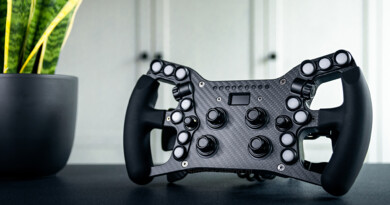
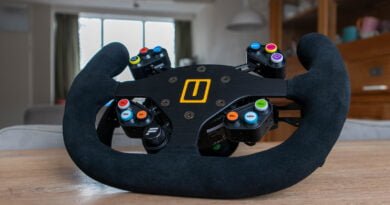
The McLaren Artura GT4 steering wheel features a butterfly-style design, meaning the center of the wheel is narrower than the outer edges, which have a diameter of 300mm. The wheel’s body is entirely made of aluminum, ensuring a sturdy yet lightweight build. The aluminum is treated with an anodized finish, and all the markings on the wheel are laser-engraved. The grips are crafted from a rubber material that is firm enough to provide a solid hold while remaining soft enough to ensure comfort during use.


Looking at the front of the Ascher Racing McLaren Artura GT4 steering wheel, your first impression might be that it appears relatively “bare.” As mentioned earlier, the requirements for real race car steering wheels differ significantly from those for sim racing wheels. Interestingly, sim racing wheels often have stricter requirements than those used by professional drivers on the track. For example, noticeable omissions on this wheel include joysticks and thumb encoders, which are features commonly requested by sim racers. The reason for this is straightforward: in a race car, drivers rarely need to navigate through menus or blackboxes. Additionally, some functions, like adjusting brake balance or activating a fuel pump, are not found on the steering wheel in real cars. Instead, they are controlled by dedicated switches or buttons located elsewhere in the cockpit.
The front of the Artura GT4 wheel is primarily equipped with the core functionalities of a race steering wheel. It features ten high-quality push buttons, all of which come with RGB backlighting for customization. At the center of the wheel are two rotary encoders in Ascher Racing’s signature red and blue colors. These rotary encoders offer versatile functionality. They can act as pulse encoders, sending a “+” or “-” signal with each rotation. Alternatively, they can function as positional encoders, where each position corresponds to a unique value. A particularly clever feature is that the left encoder can modify the functionality of the right encoder based on its position. For instance, when the left encoder is set to position “1,” the right encoder could adjust brake balance. Switching the left encoder to position “2” could change the right encoder’s function to adjust ABS strength. This innovative setup compensates for the absence of a thumb encoder, making the wheel just as versatile as one equipped with additional controls.


The back of the Artura GT4 steering wheel follows the same philosophy as the front—only the essentials of a race steering wheel are included. The sole controls on the rear are the shifter modules. However, these are exactly what you’d expect from Ascher Racing, a brand renowned for its exceptional shifters. They offer satisfying feedback and are a joy to use. For the Artura Esports Series, Ascher didn’t just reuse their existing shifter modules. Instead, they developed entirely new ones from the ground up. These sixth-generation shifter modules are magnetic and equipped with a Hall sensor, making them more reliable and durable over a longer period of time. A notable innovation in these new modules is the addition of a thin layer of sound-dampening material inside, significantly reducing the noise produced when shifting gears.
Below the shifter modules, you’ll find two cover plates. These exist because Ascher allows users to expand the wheel with optional clutch modules. The shifter modules themselves can also be swapped out for the “double shifter,” which adds an extra paddle to the shifters. This extra paddle can function as an additional button. However, both the clutch paddles and the double shifter must be purchased separately as they do not come with the steering wheel by default.
On the back of the steering wheel, you’ll also find the hole pattern for mounting the wheel. In the center, there’s a large hole where we see a USB-C connection, which is used to connect the specific Asetek Quick Release for Ascher Racing. Surrounding this central hole are the mounting holes, which allow for various Quick Releases to be attached, including those from Asetek, Fanatec, and Simagic. What stands out here is that the GT4 version of the steering wheel uses a different pattern than the other wheels in the Artura series. While the Pro and Ultimate versions are equipped with six holes in a 70mm pattern, the Artura GT4 has only three holes, with a 50mm pattern.
Finally, there’s also a connector on the back of the wheel for when it needs to be connected to the PC using the coiled cable. This is necessary if the specific Asetek Quick Release for Ascher Racing is not being used.


Assembly
Before we can attach our new steering wheel to the Asetek Invicta wheelbase, we first need to mount the Asetek Quick Release (QR) onto the wheel. Normally, this would be a simple task, but we immediately run into a small issue. The mounting hole pattern on our QR has a 70mm diameter, while the hole pattern on the back of the GT4 steering wheel is only 50mm. Fortunately, the mounting ring on the QR is removable, and underneath, the QR itself has a 50mm hole pattern. This means we need to attach the QR from the inside of the wheel rather than screwing it onto the back on the outside.
So, our first step is to take the wheel apart. There’s no manual in the box or a QR code leading us to one, but after a quick search on Ascher’s website, we find the manual on the support page and can get started right away. Using the included tools and following the manual, we carefully disassemble the wheel and disconnect the shifter modules. This part requires a bit of precision, as the wires and connectors are thin and fragile. The last thing we want is to break the wheel before we even get to use it.
Once the back of the steering wheel is removed, attaching the QR is straightforward. The provided screws fit perfectly and can be easily tightened with the included tools. Before putting the housing back on, we first plug the USB-C cable into the QR, reconnect the shifter modules, and insert the other end of the USB cable into the connector on the wheel. With all the cables secured, we carefully refit the back of the wheel, hoping not to damage anything, as the USB-C cable presses against the circuit board due to the limited space. Lastly, we screw everything back together, and the wheel is ready to use.
We do, however, find it a bit odd why this 50mm system was chosen for the GT4 wheel, especially when the other wheels in the Artura line come with a much more user-friendly 70mm variant. No one really wants to disassemble their brand-new high-end steering wheel and perform actions that could easily lead to damage if not done carefully.


In addition to mounting the QR system, the Artura GT4 steering wheel also offers the option to replace the push buttons. With a few simple steps, we can choose where we want each button to go, without the need for any stickers. The wheel is equipped with laser-engraved buttons, meaning the markings are permanently etched into the buttons and won’t wear off over time like a sticker would.
But the options are not limited to the buttons already on the wheel. As mentioned earlier, the steering wheel also comes with a bag full of additional buttoncaps, each with different icons on them.
Since we want to keep the GT4 steering wheel as original as possible, just like the one in the actual Artura GT4, we’re not going to replace the buttons ourselves. However, for anyone curious about how to swap the buttons, we refer to our review of the McLaren Artura Pro steering wheel, where we’ve explained the process in detail.
Software
To ensure that all functionalities of the Ascher Racing McLaren Artura GT4 steering wheel are fully utilized, the wheel relies on two different software packages. The wheel uses the well-known SimHub for its operation, as well as Ascher Racing Control Center for its underlying functions.
SimHub
Adding the Artura GT4 steering wheel to SimHub is a matter of just a few clicks. When we go to the “Devices” menu and click “Add new device,” then select “Ascher Racing,” the GT4 wheel clearly appears in the list of SimHub-compatible devices. By simply clicking on the wheel and pressing “Ok,” the wheel is added and appears under our “Devices” list. Once it’s listed, we can go to the “LEDs” submenu and click the “Edit profile” button, where we can adjust the background LEDs of the push buttons. Here, we can modify both the static background color and the telemetry-driven effects.


Ascher Racing Control Center
The Ascher Racing Control Center software, developed by Ascher Racing, can be downloaded from their support page on the website. Once downloaded, the software is ready to use without any installation required. When we open the software, we can see that the steering wheel is immediately recognized, and no further steps are needed.

When we dive into the software, we land directly in the “Configuration Settings” menu. Even though the Artura GT4 wheel only comes with shifter modules by default, most of this menu is dedicated to adjusting the functionality of the missing clutch. At the bottom of the menu, we find information about the rotary encoders on the wheel. Here, we can adjust the functionality of the encoders, such as whether they should operate as an encoder with fixed values or if they should only send a “+” or “-” pulse.


The second menu, called “Button Mapping,” allows us to adjust the signals of the buttons. When we bind a button in-game, it is always assigned a value such as “Btn 1” or “Btn 31.” This can be a bit confusing when we haven’t launched the sim in a while and want to check the control bindings. In this menu, we can assign our own “numbers” to the buttons in a way that makes sense to us when looking at the steering wheel.


The final menu, called “Device Info,” provides some general information about the steering wheel. It contains a few expandable sections that briefly explain how to calibrate the clutch or update the steering wheel’s firmware, among other things.

Using the Artura GT4 Steering Wheel
With everything set up on our rig and the steering wheel added in SimHub, we can now put the Ascher Racing McLaren Artura GT4 steering wheel to the test. We will take the wheel for a spin in iRacing, Assetto Corsa, and Automobilista 2 to get a good sense of its performance across different racing disciplines.

When we sit down in our seat and grab the steering wheel, the Artura GT4 feels immediately familiar. Just like its bigger brother, the Artura Pro, the GT4 wheel fits comfortably in the hand. The rubber grips feel firm yet smooth to the touch. The 300mm distance between the grips is also just right, giving us the feeling that we can hold the wheel securely. However, as we start our racing session and find ourselves in the pit lane, something catches our attention. The button with the microphone icon is blinking red on our wheel. When we turn on the pit limiter, this button turns green. Right away, we get the sense that something isn’t quite right in SimHub. After diving into the software, we confirm that the telemetry for the pit limiter doesn’t match the correct button on the wheel. After checking the Artura Pro and Artura Ultimate, we realize that the button layout on the GT4 wheel is different from the other variants. This isn’t necessarily a problem, but it can be quite a challenge to get the telemetry to the right button if you’re not really familiar with SimHub. Since we specifically selected the Artura GT4 wheel in SimHub, it should have been set up with the correct layout. Fortunately, this is just a small oversight that we quickly resolved, and it doesn’t affect the overall quality of the wheel itself. With the lighting set correctly, we can continue testing the Artura GT4.

Front Controls
Using the McLaren Artura GT4 steering wheel is a pleasure once again. Since the steering wheel doesn’t have any buttons on the lower half, all the buttons can be reached with our thumbs without needing to take our hands off the grips. The buttons themselves feel solid, with an initial soft press followed by a clear and distinct click. The click is also audible, but in a pleasant and relatively quiet way. We’re also very happy with the lighting behind the buttons. It’s bright, highly customizable, and can be set with telemetry-driven effects. Combined with the transparent icons on the buttons, it definitely improves the readability.
Additionally, the front features the two colored encoders. We really like these! Due to their elongated shape, it’s easy to adjust the encoder to the right position without looking. The feedback and resistance we feel when turning the encoder to the next position are a nice touch. The encoder has a relatively high but very pleasant resistance, making it impossible to accidentally rotate. A great bonus is that as we turn, the knob almost automatically jumps to the next position with a clear click. We really appreciate an encoder like this.
With these two control options, the entire front of the steering wheel has been covered. Do we miss the thumb encoders and joysticks while using the wheel? Yes and no. We hardly notice the lack of thumb encoders since the encoders in the middle of the wheel are so versatile. However, not having joysticks is a small downside in our opinion. It’s nice to be able to navigate through the car’s menus directly from the steering wheel. For main menus and such, we have a mouse nearby on our rig, so we wouldn’t necessarily need the joysticks.


Rear Controls
With just two “buttons” on the back of the Ascher Racing McLaren Artura GT4 steering wheel, we can keep this section brief. The shift modules from Ascher Racing are exactly what we expect and are used to. They are magnetic shift modules with a good operating resistance and a travel distance that is neither too short nor too long. Thanks to the added sound dampening in the current generation of modules, the shift modules are pleasantly quiet to use—something that improves the user experience, especially for others in the house.
To operate these shift modules, there are two paddles. The paddles are larger than those on the other Artura Esports Series models, as they are the only paddles available. With the larger paddles, shifting is easy, and we never miss the mark with our fingers. One small point worth mentioning is that the paddles are not adjustable. Personally, we don’t find this a problem with this wheel because they are positioned perfectly for us, but this might not be the case for everyone.
Conclusion
All in all, we’ve had a great time testing the Ascher Racing McLaren Artura GT4 steering wheel over the past few weeks. It’s a simple wheel, but one with a noticeably high level of quality.
As expected, the Artura GT4 steering wheel comes in a neat, well-packaged box, just like other products from Ascher Racing in the McLaren Esports series. The simple box contains not only the wheel itself but also all the necessary parts to get the wheel up and running. However, we do have some concerns regarding the setup, particularly when it comes to attaching a Quick Release system. While the other McLaren Artura steering wheels from Ascher feature a 70mm hole pattern where a Quick Release is mounted externally, the Artura GT4 has a smaller 50mm pattern, requiring the Quick Release to be attached from the inside. This means we have to disassemble a brand-new steering wheel with delicate components before we can even use it, which we consider a downside compared to the other wheels in the same series.
That said, once the wheel is in use, it’s a real pleasure to drive with. The materials used and the 300mm diameter make it comfortable to hold, and with all buttons within reach of our thumbs, the steering wheel is ergonomically designed and easy to operate. The overall handling of the wheel also feels good, thanks to the quality of the push buttons, rotary encoders, and the new sixth-generation shift modules.
One of the most notable thing of the Artura GT4 steering wheel is the lack of thumb encoders and joysticks on the front. While we had some initial concerns about this, it turned out to be much less of an issue than expected. The absence of thumb encoders didn’t affect us during use because the multifunctional rotary encoders in the center of the wheel more than made up for it. However, the lack of at least one joystick is a bit of a miss. When we need to navigate menus in-game while driving, it’s nice to have a joystick or Funky-Switch for that purpose. That being said, the Artura GT4 wheel was designed specifically for the McLaren Artura GT4 race car, where a joystick is unnecessary. This is where the difference in requirements between steering wheels for race cars and sim racers becomes evident.
At the end of the day, we’re confident that the Ascher Racing McLaren Artura GT4 steering wheel is a great piece of kit. However, we believe it’s more suited for purists, and more casual sim racers might prefer the McLaren Artura Pro steering wheel, though it comes at nearly double the price.
If you’re interested in the Ascher Racing McLaren Artura GT4 steering wheel, you can find it on the Ascher Racing webshop starting at €799.00, excluding shipping. If you use the code SIMRACEBLOGNL on the Ascher Racing website, you’ll get 5% off your order and help us create more content in the future.
Do you want to stay informed about SimRaceBlog content, news, announcements and (future) give-aways? Follow us on Instagram @simraceblognl and/or our Discord channel.