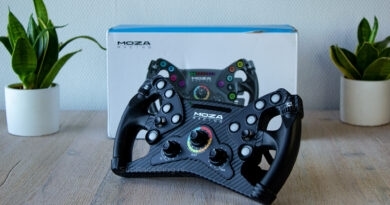
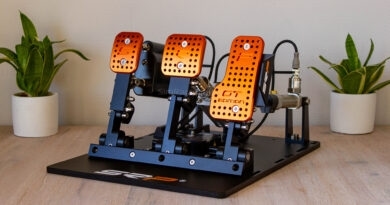
Conspit APEX Bundle
Conspit is a brand we have been able to mention several times on our platform over the past few years. Where we first became acquainted with the CPP and CPP.Lite pedal sets, the FP-Lite sim rig and the H.AO Hub + steering wheels were added later. At the Sim Expo in Dortmund, we had the opportunity to meet several times, and we also became acquainted with the wheelbases and steering wheels that are now available on the market.
For sim racers who want to make their first step into the more serious segment, Conspit has now created a bundle that provides all the necessary hardware in one go. This bundle has been released as the Conspit APEX Bundle and consists of the ARES APEX 8Nm wheelbase, the 310 APEX Steering Wheel, a CDR QR to connect the steering wheel and wheelbase, and finally the CPP APEX 2-Pedal Set. The price for this bundle is €860.00 excluding VAT and excluding shipping. If you already have the necessary hardware but are interested in one of the products from the bundle, that is no problem either, as all products in the bundle are also available separately.
Conspit asked us to review the APEX Bundle before the official release. We naturally responded yes with enthusiasm!

Packaging & Contents
The Conspit APEX Bundle was shipped to us from China via UPS and took just over a week to be delivered. We received a large brown shipping box measuring 60x40x40 cm, containing a considerable number of other brown boxes. These are the outer boxes for all products included in the APEX Bundle itself: the ARES APEX wheelbase, CDR Quick Release, CPP APEX 2-pedal set, and the 310 APEX steering wheel. Conspit also sent us some extras: a CPP APEX clutch pedal, a USB adapter ring for the wheelbase to allow the use of steering wheels from other brands, an extra Quick Release spacer, and the desktop mount for the wheelbase.
Both the ARES APEX wheelbase, the CPP APEX pedal set, and the 310 APEX steering wheel are housed in beautiful matte black boxes with Conspit branding, featuring a unique design on the front with purple details. Upon opening the boxes, we see a nice sketch board with drawings of the products in all three cases. Beneath this lies a layer of black foam, with a cut-out black box containing the quick start guide and stickers. In the case of the steering wheel, the box also includes extra magnets, stickers, and a pair of tweezers.
Beneath the foam layers in the product boxes, the steering wheel, pedal set, and wheelbase are waiting for us, neatly cut into another thick layer of foam. Included with the steering wheel is the wheel-side of the CDR Quick Release. With the wheelbase, we of course find the power adapter, mounting hardware, and USB cable. In the pedal set box, we likewise find sufficient mounting hardware, and not to forget the pedals themselves. These are individually placed in cut-outs, with the footplates separate from the pedals themselves. Finally, beneath the foam layer in which the pedals are housed, we find the baseplate for the pedal set. We also find a bag with springs and elastomers to adjust the brake pedal.

Packaging & Contents ARES APEX wheelbase


Packaging & Contents CPP APEX pedalenset


Packaging & Contents 310 APEX stuurwiel


Engineering & Quality
The 310 APEX Steering Wheel
The steering wheel included in the Conspit APEX Bundle is the 310 APEX Steering Wheel. The 310 APEX is a round wheel which, as the name suggests, has a diameter of 310mm. The rim of the wheel is neatly covered with black synthetic leather, stitched with purple thread. To finish the rim, there is a narrow purple strip at the twelve-o’clock position made from a separate piece of synthetic leather to indicate the top of the wheel. If we prefer a different rim, such as a D-shape or U-shape for an open wheel configuration, the rim can be replaced with another type.
The front side
The heart of the 310 APEX steering wheel consists entirely of a cast aluminum housing in which all input options are integrated. The wheel is equipped with eight backlit push buttons and a raised collar to prevent accidental presses. The button layout is somewhat striking; both the left and right sides have four push buttons. However, they are not all aligned in a straight line, as one position on each side that could have had a push button is instead fitted with a Funky Switch, which visually seems a bit far from the thumb. We are curious to see how this will feel in practice.
Besides the push buttons and Funky Switches, the steering wheel is also equipped with the necessary encoders. In the upper corners of the housing, we find two thumb encoders mounted on the outside of the housing, a location we have seen before on Conspit’s H.AO Hub. In addition to thumb encoders, the 310 APEX steering wheel also features rotary encoders. These are positioned at the bottom of the housing and have a numbered ring, which in turn is equipped with LED backlighting that can indicate the encoder position. These rotary encoders can be used both as pulse encoders, giving a “+” or “–” signal with each rotation, or as encoders with a fixed value. A nice extra feature of these rotary encoders is that they can also be used for encoder remapping. This means that when the rotary encoder is set to position 1, the thumb encoder on top can, for example, be used for brake balance, but if we set the rotary encoder to position 2, the thumb encoder can instead be used for ABS.
The front of the 310 APEX steering wheel, however, is not only equipped with input options but also provides visual feedback. At the top of the housing, there is a rectangular 2.99″ screen with a resolution of 800×268 pixels. One of Conspit’s seven preprogrammed dashboards can be displayed on this screen. Directly above the screen, nine individual LEDs are embedded in the housing, functioning as rev lights.


The back side
On the back of the 310 APEX steering wheel are, of course, the paddle modules. Conspit uses paddle modules for this wheel that operate according to the Hall-Effect principle, a system that registers our input magnetically without the need for a physical switch. Although there are no adjustment options for the distance and position of the paddles, it is possible to adjust the resistance of the magnets. We have the choice between a magnetic resistance of 660gf (gram-force) or 900gf, using the extra magnets provided.
A design choice we appreciate is that the 310 APEX steering wheel comes standard with Dual Clutch Paddles. In this price range, it is not guaranteed that a wheel will include these clutch levers. The clutch levers are equipped with a spring that ensures frictionless operation.
Finally, the back of the wheel is ready for the installation of a Quick-Release (QR) system. We received Conspit’s own CDR Quick-Release system, which we still need to mount on the wheel ourselves. The CDR Quick-Release system is based on a universal QR standard from NRG Innovations, a system also used by other sim racing manufacturers.


ARES APEX 8Nm Wheelbase
The ARES APEX 8Nm wheelbase is the smallest variant in Conspit’s ARES wheelbase line. However, that does not mean it is a lightweight. With the 8Nm of torque this wheelbase delivers, it competes directly with the likes of the Fanatec CSL DD, the MOZA R9, and the Simagic Alpha Evo Sport.
With dimensions of 134x150x196 mm and a weight of 5.9 kg, the ARES APEX 8Nm wheelbase is fairly compact. The wheelbase features a Skew-Pole Direct Drive motor that delivers a constant (holding) torque of 8Nm, while the 21-bit encoder ensures that the position of the steering wheel is determined with an accuracy of up to 0.00017166°. Everything is neatly held together by a metal housing with plastic covers, which does not have the standard square shape like most wheelbases but a trapezoid shape, with the top of the wheelbase narrower than the bottom. This should not pose any problems for mounting the wheelbase, as there are four M6 bolt holes on the bottom, and the sides feature flat surfaces each equipped with two M8 bolt holes.
On the output shaft of the wheelbase, we find the CDR Quick-Release system. This QR system is comparable to the NRG QR system, which is also used by Simagic and Moza, among others. This allows Conspit to open the door to steering wheels outside their own product line. To further support this, the ARES APEX 8Nm wheelbase also offers the option to install an extra “USB-A Adapter Spacer.” With this additional ring, which is sold separately, any steering wheel with a USB connection can be directly connected to the wheelbase for seamless USB passthrough to the PC. A nice visual touch on the output shaft is that the front of the shaft features Conspit’s iconic purple color with the company logo in white.
The back of the Conspit ARES APEX 8Nm wheelbase is equipped with all necessary connection points. Below the Conspit logos, neatly embossed in the housing, we find a control panel. This includes a power input, an RJ11 port for an optional emergency stop, three USB-C ports for a CAN connection, one USB-C for another incoming signal, and, of course, one USB-C port for the outgoing signal to our PC. Emphasis on PC, as this wheelbase is not compatible with PlayStation or Xbox. To complete the setup, the power button for the wheelbase is also located on the back.


CPP APEX Pedal Set
The CPP APEX pedal set is fundamentally built from high-quality, CNC-machined T6 aluminum. The finish consists of a sandblasted, black anodized coating that not only looks sleek but is also designed to withstand wear from intensive use. The baseplate is made of two parts: a plastic exterior, with a 5mm thick laser-cut steel base hidden underneath. The stainless steel heel rest provides a solid foundation for the feet.
The brake pedal is built around a compact hydraulic system with a vertical dual-chamber architecture, an evolution of Conspit’s hydraulic technology. The brake cylinder is made from a single piece of cast aluminum and CNC-finished. The 10MPa hydraulic sensor measures brake pressure with precision, which is particularly valuable for controlled hard braking and trail braking. The two-stage brake feel combines a spring for the initial travel with an elastomer for building resistance, after which the pedal’s hydraulics engage. Using the included extra springs and elastomers, the brake feel can be adjusted to preference.
The throttle pedal has a closed construction, protecting the spring and mechanical parts from dirt and wear. Throttle input is measured with a Hall sensor, ensuring stable and low-maintenance operation. Combined with the bearings, the pedal should feel smooth and frictionless.
The pedal set offers multiple adjustment options. The angle of the footplates on the individual pedals can be adjusted, although this does not apply to the angle of the pedal itself. For the throttle, brake, and optional clutch pedals, the angle of the shaft can be adjusted, which makes the force required to operate the pedal heavier or lighter. On the throttle pedal, the preload can be adjusted by turning the purple-colored housing on the pedal. The preload on the brake pedal can also be set by turning the outer ring of the cylinder using the supplied tool. All in all, the CPP APEX pedal set offers an impressive amount of adjustability, especially for an entry-level model.
The CPP APEX is compatible with virtually all aluminum-profile rigs and can also be placed freestanding using the included floor bracket. Connection is possible directly via USB or through Conspit wheelbases for an integrated setup. With Conspit Link 2.0 software, pedal curves and brake limits can be adjusted, and the set can be expanded with a clutch and an optional vibration module.


Mounting & Installation
Before we can place the APEX bundle on our setup, a few components need to be assembled and secured. We start by installing the CDR Quick-Release on the 310 APEX steering wheel. For this, we use the supplied threaded inserts, which we screw into the back of the steering wheel. Next, we plug the cable from the CDR Quick-Release into the wheel, slide the Quick-Release over the threaded inserts, and secure it with the supplied nuts.


Next, we move on to the CPP APEX pedal set. The pedals are delivered without the footplates attached and separate from the baseplate. To mount the pedals on the baseplate, we first need to remove the metal heel plate, as the connection points are located underneath. Then we simply place the pedals in the desired position and secure them with the designated bolts. We push the cable through the designated cutouts and plug it into the pedal set’s board, after which we replace the heel plate, leaving virtually no visible cable. After that, we attach the footplates to the pedals, which takes just a few seconds. Finally, we install perhaps the most unique feature of this pedal set: the grippy bracket that goes on the back of the pedal set. This allows the pedal set to be placed against a wall, where it is held securely under load, a feature we could have really used in our early years. We secure this strip with two brackets in the designated cutouts on the baseplate.


We received the optional USB spacer adapter with the ARES APEX wheelbase but did not install it at the start of the review. This means that we only need to place the wheelbase on the wheeldeck of our setup. It should fit a fairly standard hole pattern used by competitors as well. We noticed, however, that while it should fit, two of the T-slot nuts on the bottom of the wheelbase were not positioned correctly, preventing a proper fit. In consultation with Conspit, we removed a cover from the wheelbase, flipped the nuts, and replaced the cover. This allowed the wheelbase to fit perfectly on our standard wheeldeck.

Software
To configure and control the products, we first install the latest version of Conspit Link, which can be found on their very extensive Download & Support page. Installing the software is quick and easy.
When launching the software and powering on the wheelbase, all three products are immediately recognized and displayed in the sleekly designed program. On the main screen, we see a brief overview of the connected products, along with some quick settings. To get started in detail, we click the icons for the respective Conspit products in the left-hand sidebar.

CPP APEX Pedal Set
On the tab for the CPP APEX pedal set, we see a relatively concise page with settings for the pedals. On the “Calibration” tab, live telemetry data from all pedals is displayed, followed by the tabs “Clutch,” “Brake,” and “Throttle,” allowing us to choose which pedal we want to adjust. For all pedals, we can set the MIN (rest position of the pedal) and MAX (100% pedal travel) with the push of a button. On the brake pedal, the registered hydraulic pressure is displayed, and we can adjust the desired force we want to use as 100% input using the “Strength” slider. Finally, on the right side of the screen, a Custom Mapping Curve allows us to configure the behavior of the individual pedals. The “Vibration” page contains settings for optional vibration modules, which we do not have installed. The “Launch Control” page provides a tool that lets us execute a preset clutch pedal operation with a button of our choice, ensuring a consistent and smooth start in our favorite race cars.


310 APEX Steering Wheel
In Conspit Link, we also find the settings for the 310 APEX steering wheel. The main screen is “Lights & Buttons,” where we see an overview of all push buttons, which can be clicked to change the color of each individual button. We can also specify an additional color triggered by telemetry actions, such as “DRS available” or “Wheel Slip.” Further down, there is a toggle for “SimHub Mode” to control the wheel via SimHub, and a toggle for “Global Button Color” to set a single color for all buttons at once. With “Lighting Preview,” we can simulate a telemetry-driven scenario to test the above settings. On the right side of the screen, toggles allow adjustment of the screen brightness and all RGB lighting.
The “Controls” tab offers options to configure the rotary encoders in Rotary Switch Mode, where the encoder provides a + or – input, or Encoder Mode to link the input to a fixed value. With Encoder Remapping, we can assign different functions to the rotary thumb encoders depending on the position of the rotary encoder at the bottom right. A top feature, especially for an entry-level wheel.
On the “Paddles” tab, we can calibrate the shift and clutch paddles and select the mode in which we want to use the clutch paddles. The “Launch Control” tab allows us to set a fixed clutch progression in combination with a hotkey, ensuring consistent starts when using the clutch paddles. Finally, multiple profiles can be saved, allowing quick loading of wheel configurations per game, per car, or for any other need.


ARES APEX Wheelbase
The Conspit ARES APEX wheelbase can be configured in two ways in Conspit Link: via the “Basic” tab and via the “Advanced” tab. On the Basic tab, we see a limited number of accessible settings. We can adjust the steering angle and simplified settings for the total force of the wheelbase, Friction, Damping, and Smoothness. On the “Advanced” tab, a whole range of additional settings becomes available to fine-tune the wheelbase feel. Here, we see sliders for Effects, the sharpness and frequency of filters, how quickly the wheel should return to its center position, and more. Conspit’s pre-made profiles are useful as a starting point to build upon. The range of settings is extensive, which is desirable for sim racers who want to adjust their wheelbase in detail. Each option has a visible question mark, which can be hovered over with the mouse to read an explanation of the setting. Unfortunately, we find these explanations very technical and complicated, which can make them difficult to understand for beginner sim racers. In our opinion, they could have been slightly simpler. All in all, the number of settings is definitely more than adequate!


Driving with the Conspit APEX bundel
After assembling and configuring the APEX bundle, we only need to assign the inputs in our chosen racing games. We will be driving in Assetto Corsa and Assetto Corsa Competizione, with this review focusing primarily on the former. Assigning all the buttons is as easy as ever in Content Manager, and before we know it, we are ready to start our first sessions.


310 APEX Steering Wheel
Let’s start with the 310 APEX steering wheel, as this is the most prominent part of the bundle that we interact with while driving. When we sit down and take the wheel in hand, it always feels slightly different than just taking a wheel out of the box. The first impression of the 310 APEX steering wheel is positive. The synthetic leather rim feels good, and at the same time, we notice that if we spin the wheel without powering the wheelbase, it glides smoothly through the fingers and remains easy to control.
While driving, we quickly get used to the wheel. The grip is excellent and we test it, as always, both with and without gloves. Both are important to us, and both feel comfortable. The details of the wheelbase are comfortably felt through the steering wheel. The push buttons on the wheel feel solid, providing pleasant feedback with a nice, short travel. The raised collar around the buttons prevents accidental presses, although the spacing between the buttons also helps. They are spaced fairly widely, which can make it a bit tricky to move from button to button in the heat of the moment. We are quickly fans of funky switches on a wheel. The Conspit funky switches do have quite a bit of play around the neutral point, and we are not very fond of the button shape. Otherwise, the functionality is perfectly fine, and we can easily navigate through menus or MFDs.


We simply find the rotary encoders on the steering wheel to be very good. The resistance of the rotary encoders on the front of the wheel is exactly as we want it: not too loose, but not so stiff that we have to actively think about turning them. The feedback is nicely direct and clicky, just the way we like it. The rotary encoders cannot be pressed. A standout feature is the encoder remapping function we described earlier. This allows us to assign preset functions under a rotary encoder setting, which can then be operated using the rotary thumb encoders. These encoders also feel excellent, with nice feedback.

The screen on the steering wheel is a nice addition, especially for an entry-level wheel. It’s not very large, but it can display enough information and even has multiple dashboards. Despite its size, the screen is easy to read. The brightness is adequate but not extreme, and we find the color tone of the screen quite yellow-green. After a while, however, we get used to it. The RGB lighting on the buttons is also fine in terms of brightness, providing a nice, clear color display. The RPM rev lights are excellent in terms of adjustable brightness and color saturation, and are simply very usable.
Regarding the back of the steering wheel, we can be brief: the magnetic shift paddles feel very nice, solid, and direct. At the same time, they are well dampened, making them among the quietest paddles we have used—a big plus for sim racers sharing a house. The damping does not affect the feedback in the middle, however. Overall, Conspit has done very well with the shift paddles. The clutch paddles are a huge plus for a wheel in this price range; there’s little to criticize here, as it’s already great that they are included. The resistance is nicely set, and thanks to the spring and Hall sensor, the clutch operates smoothly and friction-free. Launch Control ensures consistent engagement points for every start.

ARES APEX Wheelbase
When we start driving with the APEX bundle, the first thing we notice is that we need to increase the wheelbase’s force ourselves from 6Nm to 8Nm. We leave the other settings, like filters, as they are and only ensure that the steering angle matches our game so we can test the wheelbase “out of the box,” with the exception of the force, which we want to experience fully in this scenario. The first thing that strikes us is how smooth the ARES APEX wheelbase feels. We have experienced Conspit’s wheelbases before at the Sim Expo in Dortmund, so it wasn’t a complete surprise, but we are still impressed with how good the wheelbase feels straight out of the box. We quickly notice that the 8Nm force, which Conspit specifies as constant rather than peak torque, has plenty of “punch” and provides more than enough range to receive strong feedback and convey details.
During our sessions, we continue to adjust the wheelbase settings. We quickly notice that, as we often do with wheelbases, we prefer to set the filtering low or turn it off entirely to feel the full feedback from the sim in our hands. In this case, that is also our preference. The wheelbase is more than sufficiently adjustable, and Conspit provides the choice between Basic and Advanced settings. Each setting has a question mark that can be hovered over for additional context or explanation. Fundamentally, there’s nothing wrong with this, but we find Conspit’s descriptions extremely technical, such as those for “Filter Frequency” and “Filter Sharpening.” This can make it very difficult for a beginner sim racer to understand what the setting does. Since the APEX bundle is mainly aimed at upgraders from entry-level setups, we wonder if simpler explanations could have been provided, even for “Advanced” settings. There are plenty of wheelbase presets in the Conspit software, which offer easy starting points to work from.
After spending more time with the wheelbase, we find that it simply feels very refined and mature overall. The feedback is direct, smooth, strong enough, and we can sense loss of grip well in advance. During our sessions, we did not notice any clipping, although we did not actively push the limits by setting the game feedback too high. The ARES APEX wheelbase absolutely does not feel like an entry-level wheelbase, but rather a solid, high-quality option at an affordable price.

CPP APEX pedal set
At least as important as the steering wheel and wheelbase is, of course, the CPP APEX pedal set. When unpacking and assembling it, we noticed that, compared to the CPP and CPP.Lite pedal sets we’ve tested from Conspit, it is equipped in a more straightforward manner. Still, the CPP APEX set quickly feels familiar as soon as we start driving, especially regarding the feel of the throttle and brake pedals.
The throttle pedal on the CPP APEX has a pleasant resistance right out of the box. The pedal operates very smoothly, and the end stop is slightly damped, similar to what we experienced on the CPP.Lite and a point of criticism we had with the original CPP set. The fact that the pedal angle is not adjustable is not ideal for our Formula-style sim rig, where we prefer the pedals to be upright. We can largely compensate for this by slightly adjusting the angle of the footplates and reducing the pedal travel. We also do this in combination with increasing the pedal’s resistance by raising the preload and adjusting the pedal shaft angle. For us, the throttle pedal is excellent: responsive, familiar, and simply top-notch.

The brake pedal of the CPP APEX also feels immediately familiar, thanks to Conspit’s further development of the hydraulic technology we already know. With the default setting out of the box, we can brake smoothly and predictably, consistently reaching the pedal pressure we set on the hydraulic sensor. When operating the pedal, we feel slight friction, though it’s hard to tell whether this comes from the elastomer in the cylinder or from the part compressing the fluid. Regardless, it is by no means unpleasant and is something we also recognized from the CPP.Lite pedal set.
After driving with the default setting, we also adjust the setup. We replace the spring and elastomer in the brake pedal cylinder. Removing the retaining ring is easy with the supplied tool. The spring can be removed without issue, but the elastomer cannot be extracted without detaching the pedal from the baseplate and holding it upside down. We are not fans of fiddling with pedals or having to remove them to adjust settings, so this part is not ideal. Ultimately, replacing the spring and elastomer this way works well, giving us a much firmer pedal underfoot. The adjustment range (light to heavy) is simply excellent, and we expect that every sim racer can achieve a satisfying pedal feel. It’s clear that the brake pedal is an evolution: it can be operated very heavily and can be used endlessly even in aggressive, high-resistance settings.


The clutch pedal of the CPP APEX pedal set is good and feels partly like the throttle pedal. The pedal’s progression is very linear, so we don’t feel a distinct engagement point. Still, the pedal feels wonderfully smooth and responsive, allowing perfect clutching and shifting in a manual car. There’s little else to critique; it’s already great that this entry-level pedal set is expandable with a clutch pedal that feels solid out of the box.
The CPP APEX pedal set excels in adjustability and build quality. The throttle pedal can be made significantly stiffer simply by adjusting the shaft angle and preload. Changing the angle can even be done without tools by lowering the preload and placing the shaft in a different slot. More preload also shortens the pedal travel, which is convenient for fine-tuning the feel to taste. Operation feels frictionless, with a pleasant end stop that is not too hard and lightly damped.
The CPP APEX pedal set also includes the previously mentioned bracket or “stop” at the back of the pedals, which allows the set to be placed against a wall for sim racers without a rig. We couldn’t test this in our setup, but having it is a unique reason for beginner sim racers to find this pedal set appealing. After extensive testing, we conclude that it doesn’t fully shine when placed flat on the floor against a wall, but for those who do use it this way, it’s an extremely versatile, high-quality pedal set at a reasonable price.


Conclusion
Conspit claims a particularly interesting position in the sim racing market with the APEX bundle. For €860.00 excluding VAT and shipping, you get a complete and balanced set aimed at sim racers looking for their first serious upgrade or simply seeking great value for money.
The combination of the ARES APEX wheelbase, the 310 APEX steering wheel, and the CPP APEX pedal set feels surprisingly mature for this price range. The 8Nm wheelbase is smooth, direct, and forgiving, with enough force and feedback for most sim racers. Conspit’s CDR Quick-Release system allows the wheelbase to be used with third-party steering wheels, giving sim racers nearly limitless options and flexibility. The 310 APEX steering wheel is well-built, with fine controls, excellent and quiet shift paddles, and an informative display rarely seen in this segment. The CPP APEX pedals complete the package with a hydraulic brake pedal and a high degree of adjustability, delivering a genuine bang-for-your-buck experience.
As a complete package, the APEX bundle is versatile, well-thought-out, and competitively priced. Conspit demonstrates that entry-level does not have to feel basic, and that a high-end sim racing experience can be achieved even on a budget.
The Conspit APEX bundle, consisting of the ARES APEX wheelbase, 310 APEX steering wheel, CDR Quick-Release, and CPP APEX pedal set, is available for €860.00 excluding VAT and shipping. All components of the bundle are also sold individually.
Do you want to stay informed about SimRaceBlog content, news, announcements and (future) give-aways? Follow us on Instagram @simraceblognl and/or our Discord channel.